Komut Satırı Arayüzüne Giriş
Node operatörü olarak, CLI Rocket Pool ile etkileşim kurmak için kullanacağınız birincil araçtır.
Bunu yeni minipool'lar oluşturmak, her şeyin durumunu kontrol etmek, periyodik RPL ödüllerini talep etmek, hazır olduğunuzda minipool'larınızdan çıkmak ve para çekmek ve diğer birçok faaliyet için kullanacaksınız.
Execution ve Beacon zincirlerini senkronize etmeyi tamamladıktan sonra, tüm komutlar kullanımınız için hazır olacaktır.
Bu bölümde, daha yaygın olanlardan bazılarına ve CLI'nin yapabileceği diğer bazı püf noktalara kısa bir tur atacağız.
Komutları Öğrenmek
Mevcut tüm komutları listelemek için şunu yazın:
Çıktı şöyle görünecektir:
______           _        _    ______           _
| ___ \         | |      | |   | ___ \         | |
| |_/ /___   ___| | _____| |_  | |_/ /__   ___ | |
|    // _ \ / __| |/ / _ \ __| |  __/ _ \ / _ \| |
| |\ \ (_) | (__|   <  __/ |_  | | | (_) | (_) | |
\_| \_\___/ \___|_|\_\___|\__| \_|  \___/ \___/|_|

Authored by the Rocket Pool Core Team
A special thanks to the Rocket Pool community for all their contributions.

NAME:
   rocketpool - Rocket Pool CLI

USAGE:
   rocketpoolcli [global options] command [command options] [arguments...]

VERSION:
   1.19.1

COMMANDS:
   auction, a   Manage Rocket Pool RPL auctions
   claims, l    View and claim all available rewards and credits across the node
   minipool, m  Manage the node's minipools
   megapool, g  Manage the node's megapool
   network, e   Manage Rocket Pool network parameters
   node, n      Manage the node
   odao, o      Manage the Rocket Pool oracle DAO
   pdao, p      Manage the Rocket Pool Protocol DAO
   queue, q     Manage the Rocket Pool deposit queue
   security, c  Manage the Rocket Pool security council
   service, s   Manage Rocket Pool service
   wallet, w    Manage the node wallet
   help, h      Shows a list of commands or help for one command

GLOBAL OPTIONS:
   --allow-root, -r              Allow rocketpool to be run as the root user
   --config-path path, -c path   Rocket Pool config asset path (default: "~/.rocketpool")
   --daemon-path path, -d path   Interact with a Rocket Pool service daemon at a path on the host OS, running outside of docker
   --maxFee value, -f value      The max fee (including the priority fee) you want a transaction to cost, in gwei (default: 0)
   --maxPrioFee value, -i value  The max priority fee you want a transaction to use, in gwei (default: 0)
   --gasLimit value, -l value    [DEPRECATED] Desired gas limit (default: 0)
   --nonce value                 Use this flag to explicitly specify the nonce that this transaction should use, so it can override an existing 'stuck' transaction
   --debug                       Enable debug printing of API commands
   --secure-session, -s          Some commands may print sensitive information to your terminal. Use this flag when nobody can see your screen to allow sensitive data to be printed without prompting
   --help, -h                    show help
   --version, -v                 print the version

COPYRIGHT:
   (c) 2026 Rocket Pool Pty Ltd
Service Komutları
Service grubu, smart node'un sizin için yönettiği çeşitli servisleri yönetmeyi içerir.
rocketpool service help çıktısının göstereceği şey budur:
NAME:
   rocketpool service - Manage Rocket Pool service

USAGE:
   rocketpool service [global options] command [command options] [arguments...]

VERSION:
   1.19.1

COMMANDS:
   install, i                 Install the Rocket Pool service
   config, c                  Configure the Rocket Pool service
   status, u                  View the Rocket Pool service status
   start, s                   Start the Rocket Pool service
   pause, p                   Pause the Rocket Pool service
   stop, o                    Pause the Rocket Pool service (alias of 'rocketpool service pause')
   reset-docker, rd           Cleanup Docker resources, including stopped containers, unused images and networks. Stops and restarts Smart Node.
   prune-docker, pd           Cleanup unused Docker resources, including stopped containers, unused images, networks and volumes. Does not restart smartnode, so the running containers and the images and networks they reference will not be pruned.
   logs, l                    View the Rocket Pool service logs
   stats, a                   (DEPRECATED) No longer supported. Use 'docker stats -a' instead
   compose                    View the Rocket Pool service docker compose config
   version, v                 View the Rocket Pool service version information
   prune-eth1, n              Shuts down the main ETH1 client and prunes its database, freeing up disk space, then restarts it when it's done.
   install-update-tracker, d  Install the update tracker that provides the available system update count to the metrics dashboard
   get-config-yaml            Generate YAML that shows the current configuration schema, including all of the parameters and their descriptions
   resync-eth1                Deletes the main ETH1 client's chain data and resyncs it from scratch. Only use this as a last resort!
   resync-eth2                Deletes the ETH2 client's chain data and resyncs it from scratch. Only use this as a last resort!
   terminate, t               Deletes all of the Rocket Pool Docker containers and volumes, including your ETH1 and ETH2 chain data and your Prometheus database (if metrics are enabled). Also removes your entire `.rocketpool` configuration folder, including your wallet, password, and validator keys. Only use this if you are cleaning up the Smart Node and want to start over!

GLOBAL OPTIONS:
   --compose-file value, -f value  Optional compose files to override the standard Rocket Pool docker compose YAML files; this flag may be defined multiple times
   --help, -h                      show help
status
Bu komut, Rocket Pool tarafından yönetilen her bir Docker konteynerinin mevcut çalışma durumunu gösterir.
Örneğin, varsayılan Docker kurulumunun çıktısı şöyle görünür:
        Name                       Command              State                                                       Ports
------------------------------------------------------------------------------------------------------------------------------------------------------------------------------
rocketpool_api          /bin/sleep infinity             Up
rocketpool_eth1         sh /setup/start-node.sh         Up      0.0.0.0:30303->30303/tcp,:::30303->30303/tcp, 0.0.0.0:30303->30303/udp,:::30303->30303/udp, 8545/tcp, 8546/tcp
rocketpool_eth2         sh /setup/start-beacon.sh       Up      0.0.0.0:9001->9001/tcp,:::9001->9001/tcp, 0.0.0.0:9001->9001/udp,:::9001->9001/udp
rocketpool_node         /go/bin/rocketpool node         Up
rocketpool_validator    sh /setup/start-validator.sh    Up
rocketpool_watchtower   /go/bin/rocketpool watchtower   Up
Bunu Docker konteynerlerinden herhangi birinin sorun yaşayıp yaşamadığını hızlıca kontrol etmek veya bir start veya stop komutunun doğru çalıştığından emin olmak için kullanabilirsiniz.
start ve stop
Bu iki komutu zaten tanıyorsunuz.
Sadece tüm Rocket Pool konteynerlerini başlatır veya durdururlar.
Tip
pause komutu stop ile aynı şeyi yapar.
Sadece Rocket Pool'un önceki sürümlerinden kalma eski bir komuttur.
logs
Bu komut, zaten görmüş olmanız gereken bir diğer komuttur.
Her Docker konteynerinin çıktı loglarına bakmak için kullanabilirsiniz.
Bu, sorun giderme veya onlardan daha ayrıntılı bir durum raporu almak için yararlı olabilir.
Eğer başka argüman olmadan sadece rocketpool service logs yaparsanız, tüm logları bir araya toplayacak ve size hepsini bir kerede gösterecektir.
Bir konteynerin çıktısına odaklanmak istiyorsanız, konteyneri belirtmek için sonuna bir argüman ekleyebilirsiniz.
Geçerli değerler: eth1, eth2, validator, api, node, watchtower, prometheus, grafana ve node-exporter.
stats
Bu komut, her konteynerden bazı kaynak istatistiklerini gösterir, bunu her birinin donanım ve ağ tüketimini profil etmek için kullanabilirsiniz.
Sisteminiz yavaş çalışmaya başlarsa veya RAM sorunları yaşarsa konteyerleri izlemek için yararlı bulabilirsiniz.
İşte bazı örnek çıktılar:
CONTAINER ID   NAME                    CPU %     MEM USAGE / LIMIT     MEM %     NET I/O           BLOCK I/O         PIDS
62314e5a0ecf   rocketpool_api          0.00%     18.89MiB / 62.78GiB   0.03%     50.6kB / 31.1kB   57.4MB / 0B       1
ac629c08c896   rocketpool_eth1         5.44%     18.13GiB / 62.78GiB   28.88%    1.63GB / 1.66GB   24.4GB / 37.7GB   27
4dfc7a2e939b   rocketpool_eth2         97.39%    2.369GiB / 62.78GiB   3.77%     1.79GB / 45MB     333MB / 24.1GB    2
a3c22f54eff0   rocketpool_node         0.00%     12.13MiB / 62.78GiB   0.02%     308kB / 504kB     0B / 0B           15
0d5818868ef6   rocketpool_validator    0.00%     936KiB / 62.78GiB     0.00%     12.1kB / 0B       4.57MB / 0B       2
88bea525fa89   rocketpool_watchtower   0.00%     12.05MiB / 62.78GiB   0.02%     304kB / 503kB     0B / 0B           16
NOT
Buradaki RAM istatistiği toplam tahsis edilmiş belleği gösterir, bu sanal belleği içerir.
Ham yerleşik bellek tüketimini göstermez.
Benzer şekilde, CPU kullanımı, konteynerin kullandığı tüm CPU çekirdeklerinde ortalaması alınan toplam CPU tüketim miktarını gösterir.
Burada, ETH2 için CPU neredeyse %100 gösteriyor çünkü tek iş parçacıklı olan Nimbus kullanıyor.
htop veya btop gibi bir programın gerçek kaynak tüketimine daha iyi içgörü sunabileceğini görebilirsiniz.
config
Bu komut yapılandırma röportajını yeniden çalıştırır.
Execution veya Consensus istemci seçiminizi değiştirmek veya onları seçtiğinizde başlangıçta belirttiğiniz bazı parametreleri değiştirmek istiyorsanız bunu kullanabilirsiniz (örneğin validator'ınızın graffiti mesajı, bağlanılacak maksimum peer sayısı vb.).
Bu komutu istediğiniz zaman çağırabilirsiniz, ancak değişiklikler rocketpool service stop ve rocketpool service start komutlarını çağırana kadar etkili olmayacaktır.
terminate
Bu komut Docker konteynerlerini kapatacak, ardından onları, Rocket Pool sanal ağını ve ETH1 ve ETH2 zincir veri hacimlerini silecektir.
Temelde Docker kurulumunuzdan tüm Rocket Pool öğelerini kaldırır.
Rocket Pool kurulumunun bu bölümünü temizlemek istediğinizde bunu kullanın.
Warning
Bu, zincir verilerinizi geri döndürülemez şekilde kaldıracaktır, bu da ETH1 ve ETH2'yi tekrar senkronize etmeniz gerektiği anlamına gelir.
Bu, cüzdan ve şifre dosyalarınızı, yapılandırılmış ayarlarınızı veya validator anahtarlarınızı kaldırmayacaktır.
Bunları kaldırmak için, Docker veya Hybrid Mode'da ~/.rocketpool/data klasörünü veya Native Mode'da ilgili dizini silmeniz gerekecektir.
Node Komutları
node grubu, Rocket Pool node'unuzdaki işlemleri içerir.
Bunları bir sonraki bölümde bir minipool oluştururken daha ayrıntılı olarak ele alacağız, ancak hepsini bir bakışta görmek yararlı olabilir.
rocketpool node help çıktısının göstereceği şey budur:
NAME:
   rocketpool node - Manage the node

USAGE:
   rocketpool node command [command options] [arguments...]

COMMANDS:
   status, s                                     Get the node's status
   sync, y                                       Get the sync progress of the eth1 and eth2 clients
   register, r                                   Register the node with Rocket Pool
   rewards, e                                    Get the time and your expected RPL rewards of the next checkpoint
   set-primary-withdrawal-address, w             Set the node's primary withdrawal address, which will receive all ETH rewards (and RPL if the RPL withdrawal address is not set)
   confirm-primary-withdrawal-address, f         Confirm the node's pending primary withdrawal address if it has been set back to the node's address itself
   set-rpl-withdrawal-address, srwa              Set the node's RPL withdrawal address, which will receive all RPL rewards and staked RPL withdrawals
   confirm-rpl-withdrawal-address, crwa          Confirm the node's pending rpl withdrawal address if it has been set back to the node's address itself
   allow-rpl-locking, arl                        Allow the node to lock RPL when creating governance proposals/challenges
   deny-rpl-locking, drl                         Do not allow the node to lock RPL when creating governance proposals/challenges
   set-timezone, t                               Set the node's timezone location
   swap-rpl, p                                   Swap old RPL for new RPL
   stake-rpl, k                                  Stake RPL against the node
   add-address-to-stake-rpl-whitelist, asw       Adds an address to your node's RPL staking whitelist, so it can stake RPL on behalf of your node.
   remove-address-from-stake-rpl-whitelist, rsw  Removes an address from your node's RPL staking whitelist, so it can no longer stake RPL on behalf of your node.
   claim-rewards, c                              Claim available RPL and ETH rewards for any checkpoint you haven't claimed yet
   withdraw-rpl, i                               Withdraw RPL staked against the node
   withdraw-eth, h                               Withdraw ETH staked on behalf of the node
   withdraw-credit, wc                           (Saturn) Withdraw ETH credit from the node as rETH
   deposit, d                                    Make a deposit and create a minipool
   create-vacant-minipool, cvm                   Create an empty minipool, which can be used to migrate an existing solo staking validator as part of the 0x00 to 0x01 withdrawal credentials upgrade
   send, n                                       Send ETH or tokens from the node account to an address. ENS names supported. Use 'all' as the amount to send the entire balance. <token> can be 'rpl', 'eth', 'fsrpl' (for the old RPL v1 token), 'reth', or the address of an arbitrary token you want to send (including the 0x prefix).
   set-voting-delegate, sv                       (DEPRECATED) Use `rocketpool pdao set-signalling-address` instead
   clear-voting-delegate, cv                     (DEPRECATED) Use `rocketpool pdao clear-signalling-address` instead
   initialize-fee-distributor, z                 Create the fee distributor contract for your node, so you can withdraw priority fees and MEV rewards after the merge
   distribute-fees, b                            Distribute the priority fee and MEV rewards from your fee distributor to your withdrawal address and the rETH contract (based on your node's average commission)
   join-smoothing-pool, js                       Opt your node into the Smoothing Pool
   leave-smoothing-pool, ls                      Leave the Smoothing Pool
   sign-message, sm                              Sign an arbitrary message with the node's private key
   send-message                                  Send a zero-ETH transaction to the target address (or ENS) with the provided hex-encoded message as the data payload
   claim-unclaimed-rewards, cur                  Sends any unclaimed rewards to the node's withdrawal address
   provision-express-tickets, pet                Provision the node's express tickets

OPTIONS:
   --help, -h  show help
Aşağıda, tipik node işletimi sırasında ihtiyaç duyma eğiliminde olacağınız komutlardan bazılarının bir özeti bulunmaktadır.
status
Bu komut size tüm node'unuzun bir bakışta yüksek seviye bir görünümünü verecektir.
Ne kadar ETH ve RPL stake ettiğinizi, kaç minipool'unuz olduğunu ve durumlarını, RPL teminat oranınızı ve daha fazlasını içerir.
Bu, node'unuzu kaydettiğinizde ve bazı minipool'ları kurduğunuzda rocketpool node status komutunun gösterdiği bir örnektir:
=== Account and Balances ===
The node 0x4d19DE4A5a1B1B36EBaB3D5c32C01061fbDE328d has a balance of 49.402553 ETH and 0.000000 RPL.
The node has 0.000000 ETH in its credit balance and 0.000000 ETH staked on its behalf. 0.000000 can be used to make new validators.
The node is registered with Rocket Pool with a timezone location of America/Los_Angeles.

=== Megapool ===
The node has a megapool deployed at 0xCf3576c5A6e5a25AC00C9adb6751924BAe1680B1.
The megapool has 9 validators.
The node has 0 express queue ticket(s).

=== Penalty Status ===
The node does not have any penalties for cheating with an invalid fee recipient.

=== Signalling on Snapshot ===
The node does not currently have a snapshot signalling address set.
To learn more about snapshot signalling, please visit https://docs.rocketpool.net/pdao/participate#setting-your-snapshot-signalling-address.
Rocket Pool has no Snapshot governance proposals being voted on.

=== Onchain Voting ===
The node doesn't have a delegate, which means it can vote directly on onchain proposals. You can have another node represent you by running `rocketpool p svd <address>`.
The node is NOT allowed to lock RPL to create governance proposals/challenges.

=== Primary Withdrawal Address ===
The node's primary withdrawal address has not been changed, so ETH rewards and minipool withdrawals will be sent to the node itself.
Consider changing this to a cold wallet address that you control using the `set-withdrawal-address` command.

=== RPL Withdrawal Address ===
The node's RPL withdrawal address has not been set. All RPL rewards will be sent to the primary withdrawal address.

=== Fee Distributor and Smoothing Pool ===
The node's fee distributor 0x84c1f488CDecb2E335c40901E3Fe58925f4cC9A7 has a balance of 0.004897 ETH.
NOTE: You are in Native Mode; you MUST ensure that your Validator Client is using this address as its fee recipient!
The node is not opted into the Smoothing Pool.
To learn more about the Smoothing Pool, please visit https://docs.rocketpool.net/upgrades/redstone/whats-new#smoothing-pool.
You have 3 minipools that would earn extra commission if you opted into the smoothing pool!
See https://rpips.rocketpool.net/RPIPs/RPIP-62 for more information about bonus commission, or run `rocketpool node join-smoothing-pool` to opt in.

=== RPL Stake ===
NOTE: The following figures take *any pending bond reductions* into account.

The node has a total stake of 20000.000000 RPL.
This is currently 3.74% of its borrowed ETH and 30.06% of its bonded ETH.
The node has 0.000000 megapool staked RPL.
The node has 20000.000000 legacy staked RPL.
The node has a total stake (legacy minipool RPL plus megapool RPL) of 20000.000000 RPL.
You have 0.000000 RPL staked on your megapool and can request to unstake up to 0.000000 RPL

=== Minipools ===
The node has a total of 3 active minipool(s):
- 3 staking
sync
Bu komut, Execution ve Consensus istemcilerinizin mevcut senkronizasyon durumunu gösterecektir.
Muhtemelen node'u ilk kurduğunuzda bunu çok kullanacaksınız, ardından bir daha ihtiyacınız olmayacak (istemcilerinizi değiştirmediğiniz veya sıfırlamadığınız sürece).
rocketpool node sync komutunun çıktısı şöyle görünecektir:
Your Smartnode is currently using the Hoodi Test Network.

Your eth1 client hasn't synced enough to determine if your eth1 and eth2 clients are on the same network.
To run this safety check, try again later when eth1 has made more sync progress.

Your primary execution client is still syncing (67.12%).
You do not have a fallback execution client enabled.
Your primary consensus client is still syncing (99.94%).
You do not have a fallback consensus client enabled.
Prysm'in şu anda tamamlanma yüzdesini sağlamadığını unutmayın - kullanıyorsanız eth2 loglarına bakmanız gerekecek.
stake-rpl
Bu komut, node'unuza daha fazla RPL teminatı eklemek istediğinizde kullanacağınız komuttur.
Bunu yapmak teminat oranınızı artıracaktır, bu da her kontrol noktasında RPL ödüllerinizi artıracaktır (bunun hakkında daha sonra).
Şimdiye kadarki diğer komutların aksine, bu aslında etkileşimlidir çünkü bir işlemi tetikleyecektir - sadece bilgilendirici değildir.
Önce size ne kadar RPL stake etmek istediğinizi soracak, kolaylık için bazı önceden tanımlanmış seçenekler veya özel bir miktar belirtme yeteneği ile:
NOTE: By staking RPL, you become a member of the Rocket Pool pDAO. Stay informed on governance proposals by joining the Rocket Pool Discord.

Please choose an amount of RPL to stake:
1: 5% of borrowed ETH (733.993926 RPL) for one validator?
2: 10% of borrowed ETH (1467.987852 RPL) for one validator?
3: 15% of borrowed ETH (2201.981778 RPL) for one validator?
4: Your entire RPL balance (20000.000000 RPL)?
5: A custom amount
Bir seçenek seçtiğinizde, size önerilen gaz fiyatı ve kullanılacak tahmini miktar hakkında bazı bilgiler ile birlikte bir onay diyalogu gösterilecektir. Node'da ilk kez RPL stake ediyorsanız, stake etme sözleşmesine RPL'nizle etkileşim kurma izni vermeniz gerekecektir:
Before staking RPL, you must first give the staking contract approval to interact with your RPL.
This only needs to be done once for your node.
+============== Suggested Gas Prices ==============+
| Avg Wait Time |  Max Fee  |    Total Gas Cost    |
| 15 Seconds    | 4 gwei    | 0.0001 to 0.0001 ETH |
| 1 Minute      | 4 gwei    | 0.0001 to 0.0001 ETH |
| 3 Minutes     | 4 gwei    | 0.0001 to 0.0001 ETH |
| >10 Minutes   | 4 gwei    | 0.0001 to 0.0001 ETH |
+==================================================+

These prices include a maximum priority fee of 2.00 gwei.
Please enter your max fee (including the priority fee) or leave blank for the default of 4 gwei:

Using a max fee of 4.00 gwei and a priority fee of 2.00 gwei.
Do you want to let the staking contract interact with your RPL? [y/n]
y

Approving RPL for staking...
Transaction has been submitted with hash <transaction hash>.
You may follow its progress by visiting:
https://hoodi.etherscan.io/tx/<transaction hash>

Waiting for the transaction to be included in a block... you may wait here for it, or press CTRL+C to exit and return to the terminal.

Successfully approved staking access to RPL.
RPL Stake Gas Info:
+============== Suggested Gas Prices ==============+
| Avg Wait Time |  Max Fee  |    Total Gas Cost    |
| 15 Seconds    | 4 gwei    | 0.0005 to 0.0007 ETH |
| 1 Minute      | 4 gwei    | 0.0005 to 0.0007 ETH |
| 3 Minutes     | 4 gwei    | 0.0005 to 0.0007 ETH |
| >10 Minutes   | 4 gwei    | 0.0005 to 0.0007 ETH |
+==================================================+

These prices include a maximum priority fee of 2.00 gwei.
Please enter your max fee (including the priority fee) or leave blank for the default of 4 gwei:

Using a max fee of 4.00 gwei and a priority fee of 2.00 gwei.
Are you sure you want to stake 733.993925 RPL? You will not be able to unstake this RPL until you exit your validators and close your minipools, or reach 2201.981777 staked RPL (15% of bonded eth)! [y/n]
Onaylarsanız, size işlem hash'i gösterilecek ve ilerlemesini takip edebilmeniz için Etherscan'e bir bağlantı verilecektir:
Staking RPL...
Transaction has been submitted with hash <transaction hash>.
You may follow its progress by visiting:
https://hoodi.etherscan.io/tx/<transaction hash>

Waiting for the transaction to be included in a block... you may wait here for it, or press CTRL+C to exit and return to the terminal.

Successfully staked 733.993925 RPL.
Çoğu işlem yalnızca bir işlem gerektirir, bu nedenle CLI bir bloğa dahil edilene kadar bekleyecek ve ardından çıkacaktır. Ancak, stake-rpl iki işlem gerektiren birkaç komuttan biridir, bu nedenle bu diyalog iki kez görünecektir.
claim-rewards
Node'unuz yeni bir ödül kontrol noktası tespit ettiğinde, otomatik olarak o aralığın bilgilerini içeren ödül ağacı dosyasını indirecektir (Download Mode varsayılanını kullanıyorsanız - kendi ağaçlarınızı oluşturmak yerine indirme hakkında bilgi için aşağıya bakın).
Ardından ödüllerinizi aşağıdaki komutu kullanarak inceleyebilirsiniz:
rocketpool node claim-rewards
Aralıklar ilerledikçe ve ödüller biriktikçe, çıktı şöyle görünecektir:
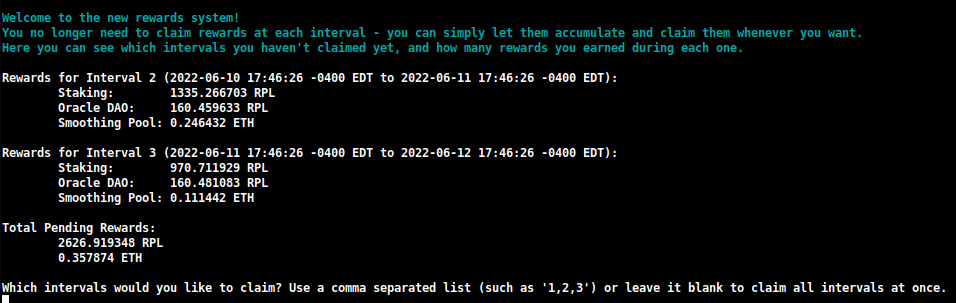
Burada her aralıkta kaç ödül kazandığınızı hızlıca görebilir ve hangilerini talep etmek istediğinize karar verebilirsiniz.
Bu talep sırasında yeniden stake etmek istediğiniz bir miktar da belirtebilirsiniz:

Bu, RPL ödüllerinizi tek bir işlemde birleştirmenize izin verecektir, eski talep sistemiyle şu anda kullanmanız gerekenden önemli ölçüde daha az gaz kullanarak.
NOT
Eğer Oracle DAO tarafından oluşturulan ödül kontrol noktasını indirmek yerine manuel olarak oluşturmayı tercih ederseniz, bu ayarı TUI'de Download'dan Generate'e değiştirebilirsiniz:
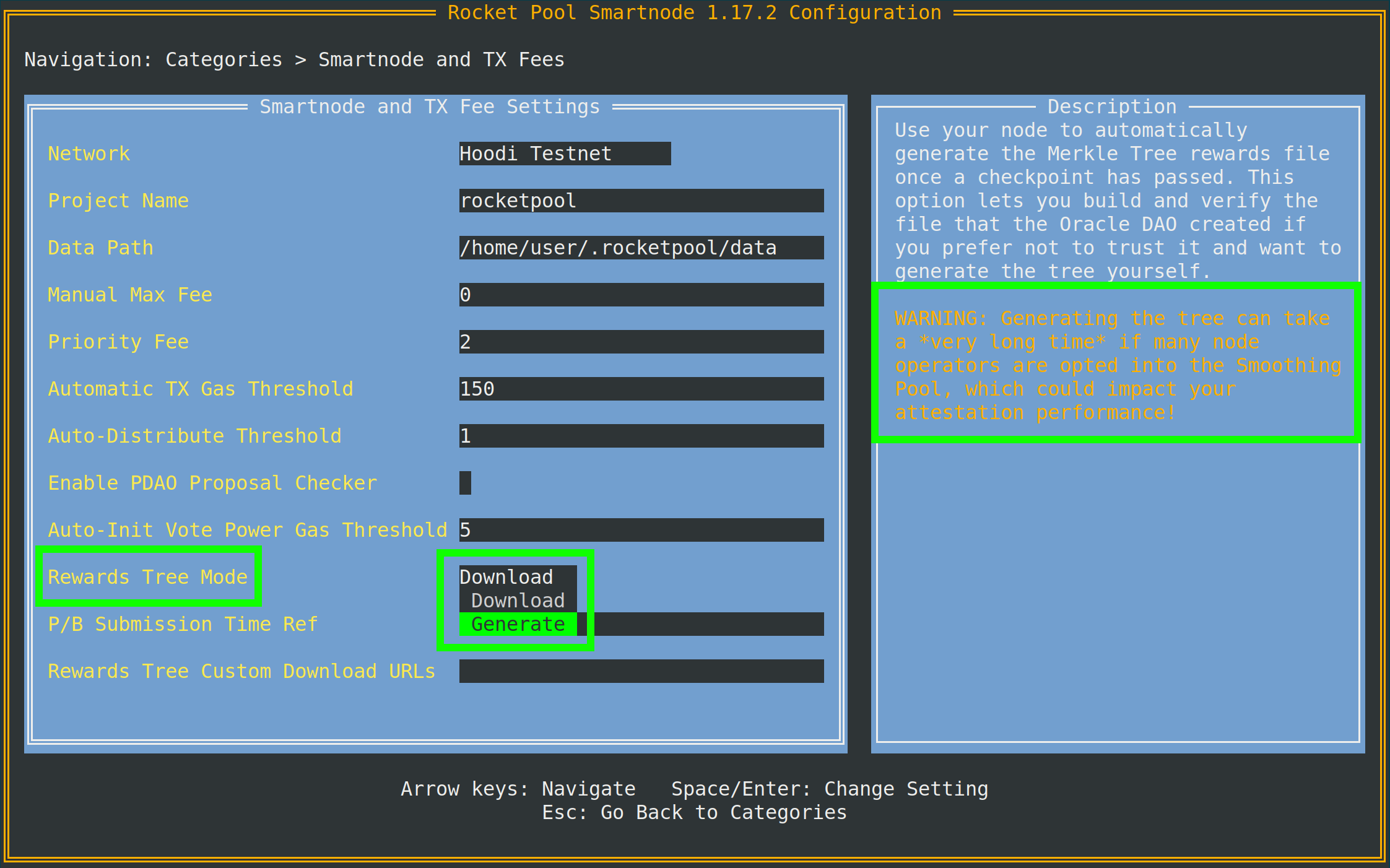
İpucunun ima ettiği gibi, bunu yapmak için bir Execution istemcisi arşiv node'una erişmeniz gerekecektir.
Eğer yerel Execution istemciniz bir arşiv node'u değilse, aynı menüde daha aşağıda bulunan Archive-Mode EC URL'de ayrı bir tane (Infura veya Alchemy gibi) belirtebilirsiniz.
Bu URL yalnızca Merkle ağaçları oluşturulurken kullanılacaktır; doğrulama görevleri için kullanılmayacaktır.
join-smoothing-pool
rocketpool node join-smoothing-pool
Bu, sizi Rocket Pool sözleşmelerinde katılmış olarak kaydedecek ve Validator Client'ınızın fee recipient'ini otomatik olarak node'unuzun dağıtıcı sözleşmesinden Smoothing Pool sözleşmesine değiştirecektir.
Katıldıktan sonra, çıkış yapabilmeniz için 28 günlük bir bekleme süresi olduğunu (bir tam ödül aralığı uzunluğu) unutmayın.
leave-smoothing-pool
rocketpool node leave-smoothing-pool
Bu, şu anda katılmışsanız ve katıldıktan sonra en az 28 gün beklediyseniz sizi Smoothing Pool'dan çıkaracaktır.
Mevcut epoch'tan sonraki epoch sonlandırıldığında, otomatik olarak node'unuzun fee recipient'ini Smoothing Pool'dan tekrar node'unuzun dağıtıcı sözleşmesine değiştirecektir.
Bu, önümüzde bir teklif geldiğini gördüğünüzde çıkış sürecinden önce hareket ettiğiniz için cezalandırılmamanızı sağlamak içindir.
distribute-fees
Ücret dağıtıcınızda ödüller kazandıktan sonra, aşağıdaki komutu kullanarak tüm bakiyesini talep edebilir ve dağıtabilirsiniz:
rocketpool node distribute-fees
Bu, ödüllerin sizin payınızı withdrawal adresinize gönderecektir.
send
Bu komut, node cüzdanından farklı bir adrese ETH, RPL veya diğer Rocket Pool ile ilgili token'ları göndermenize izin verir.
Bu, cüzdandaki fonlarınızı başka bir yere taşımak istiyorsanız yararlı olabilir.
send komutunu kullanmanın sözdizimi şöyledir:
rocketpool node send <amount> <token> <address or ENS name>
Argümanlar şunlardır:
<amount> gönderilecek token miktarıdır.<token> gönderilecek token'dır - bu eth, rpl, fsrpl (eski legacy RPL token'ı) veya reth olabilir.<address or ENS name> token'ların gönderileceği Ethereum adresi (veya ENS adı)dır.
Örneğin:
rocketpool node send 1 eth <my friend's address>
arkadaşıma 1 ETH gönderir.
Megapool Komutları
megapool grubu, megapool'unuzu ve megapool validator'larınızı yönetmek için kullanılan tüm komutlara erişebileceğiniz yerdir.
rocketpool megapool help komutunun göstereceği şey budur:
NAME:
   rocketpool megapool - Manage the node's megapool

USAGE:
   rocketpool megapool [global options] command [command options] [arguments...]

VERSION:
   1.19.1

COMMANDS:
   deposit, d                Make a deposit and create a new validator on the megapool. Optionally specify count to make multiple deposits.
   status, s                 Get the node's megapool status
   validators, v             Get a list of the megapool's validators
   repay-debt, r             Repay megapool debt
   reduce-bond, e            Reduce the megapool bond
   claim, c                  Claim any megapool rewards that were distributed but not yet claimed
   stake, k                  Stake a megapool validator
   exit-queue, x             Exit the megapool queue
   dissolve-validator, i     Dissolve a megapool validator
   exit-validator, t         Request to exit a megapool validator
   notify-validator-exit, n  Notify that a validator exit is in progress
   notify-final-balance, f   Notify that a validator exit has completed and the final balance has been withdrawn
   distribute, b             Distribute any accrued execution layer rewards sent to this megapool

GLOBAL OPTIONS:
   --help, -h  show help
Aşağıda normal operasyon sırasında tipik olarak kullanacağınız komutların bir özeti bulunmaktadır:
deposit
Bu komut, megapool'unuzda yeni validator'lar oluşturmanıza izin verir. Bunu daha sonra daha ayrıntılı ele alacağız. Önizleme istiyorsanız Megapool Validator Oluşturma bölümüne geçmekten çekinmeyin.
status
Bu komut, megapool'unuzun durumu ve megapool'unuz tarafından yönetilen validator'lar hakkında bazı bilgiler verir. Megapool'unuzun adresini, express queue biletlerinin sayısını, megapool'unuzun delege adresini, execution ve consensus katmanındaki ETH bakiyesini ve çok sayıda diğer yararlı bilgiyi görebileceksiniz. İşte rocketpool megapool status çıktısının bir örneği:
=== Megapool ===
The node has a megapool deployed at 0xCf3576c5A6e5a25AC00C9adb6751924BAe1680B1
The node has 0 express ticket(s).
The megapool has 9 validators.

=== Megapool Delegate ===
The megapool is using the latest delegate.
The megapool's effective delegate address is 0x138602A95956995280f1146aA9477d6B4E481B3c
The megapool has automatic delegate upgrades disabled. You can toggle this setting using 'rocketpool megapool set-use-latest-delegate'.

=== Megapool Balance ===
The megapool has 4.000000 node bonded ETH.
The megapool has 28.000000 RP ETH for a total of 32.000000 bonded ETH.
Megapool balance (EL): 32.051883 ETH
The megapool has 1 validators exiting. You'll be able to see claimable rewards once the exit process is completed.
Beacon balance (CL): 0.000000 ETH
Your portion: 0.000000 ETH
Current network commission: 5.000000%
validators
rocketpool megapool validators komutu, node'unuzun megapool'u tarafından yönetilen her bir validator'ın durumunu gösterir. Validator pubkey'leri, beacon chain durumu ve prestaking validator'larının kuyruk konumu gibi bilgileri görebileceksiniz:
There are 8 validator(s) on the express queue.
There are 2 validator(s) on the standard queue.
The express queue rate is 2.

1 Staking validator(s):

Megapool Validator ID:        1
Validator pubkey:             <pubkey>
Validator active:             no
Validator index:              <index>
Beacon status:                pending_queued
Express Ticket Used:          no


1 Initialized validator(s):

--------------------

Megapool Validator ID:        2
Expected pubkey:              <pubkey>
Validator active:             no
Validator Queue Position:     10
Express Ticket Used:          no


1 Exiting validator(s):

--------------------

Megapool Validator ID:        0
Validator pubkey:             <pubkey>
Validator active:             no
Validator index:              <index>
Beacon status:                withdrawal_done
Express Ticket Used:          yes
exit-validator
Bu komut, Beacon Chain'de gönüllü olarak çıkış yapmak üzere bir validator seçmenize izin verir. Bir validator'ı kapatmak ve son ETH bakiyesini çekmek istediğinizde bunu kullanın. Bunun geri alınamayacağını unutmayın - bir çıkış tetiklediğinizde, validator kalıcı olarak kapanacaktır.
Minipool Komutları
minipool grubu, minipool'larınızı etkileyen komutları içerir.
node grubunda olduğu gibi, bunları bir sonraki bölümde daha ayrıntılı olarak ele alacağız ancak hepsini şimdi görmek yararlı olabilir.
rocketpool minipool help çıktısının göstereceği şey budur:
NAME:
   rocketpool minipool - Manage the node's minipools

USAGE:
   rocketpool minipool command [command options] [arguments...]

COMMANDS:
   status, s                  Get a list of the node's minipools
   stake, t                   Stake a minipool after the scrub check, moving it from prelaunch to staking.
   set-withdrawal-creds, swc  Convert the withdrawal credentials for a migrated solo validator from the old 0x00 value to the minipool address. Required to complete the migration process.
   import-key, ik             Import the externally-derived key for a minipool that was previously a solo validator, so the Smart Node's VC manages it instead of your externally-managed VC.
   promote, p                 Promote a vacant minipool after the scrub check, completing a solo validator migration.
   refund, r                  Refund ETH belonging to the node from minipools
   begin-bond-reduction, bbr  Begins the ETH bond reduction process for a minipool, taking it from 16 ETH down to 8 ETH (begins conversion of a 16 ETH minipool to an LEB8)
   reduce-bond, rb            Manually completes the ETH bond reduction process for a minipool from 16 ETH down to 8 ETH once it is eligible. Please run `begin-bond-reduction` first to start this process.
   distribute-balance, d      Distribute a minipool's ETH balance between your withdrawal address and the rETH holders.
   exit, e                    Exit staking minipools from the beacon chain
   close, c                   Withdraw any remaining balance from a minipool and close it
   delegate-upgrade, u        Upgrade a minipool's delegate contract to the latest version
   find-vanity-address, v     Search for a custom vanity minipool address
   rescue-dissolved, rd       Manually deposit ETH into the Beacon deposit contract for a dissolved minipool, activating it on the Beacon Chain so it can be exited.

OPTIONS:
   --help, -h  show help
Aşağıda genellikle kullanacağınız komutların bir özeti bulunmaktadır.
status
Bu komut sadece her minipool'unuzun bir özetini sağlar.
Bu, mevcut durumunu, minipool'un eth1 adresini, üzerindeki komisyonu (node fee olarak adlandırılır), ilgili ETH2 validator'ının genel anahtarını ve diğer bazı şeyleri içerir:
$ rocketpool minipool status

1 Staking minipool(s):

--------------------

Address:                <minipool eth1 address>
Penalties:             0
Status updated:        2025-07-15, 08:31 +0000 UTC
Node fee:              5.000000%
Node deposit:          8.000000 ETH
RP ETH assigned:       2025-07-14, 20:26 +0000 UTC
RP deposit:            24.000000 ETH
Minipool Balance (EL): 0.064202 ETH
Your portion:          0.018458 ETH
Available refund:      0.000000 ETH
Total EL rewards:      0.018458 ETH
Validator pubkey:      <validator eth2 address>
Validator index:       <validator eth2 index>
Validator active:      yes
Beacon balance (CL):   32.000347 ETH
Your portion:          8.000099 ETH
Use latest delegate:   no
Delegate address:      0x56903694d881282D33ed0643EAe14263880Dd47F
Rollback delegate:     <none>
Effective delegate:    0x56903694d881282D33ed0643EAe14263880Dd47F
refund
Bu komut, bir tane oluşturmak için 32 ETH yatırdıysanız, Rocket Pool rETH stake etme havuzundan 16 ETH katkıda bulunabildiğinde bir minipool'dan 16 ETH geri çekmenize izin verir.
exit
Bu komut, Beacon Chain'deki validator'ınız için gönüllü bir çıkış gönderir.
Bir validator'ı kapatmak ve son ETH bakiyesini çekmek istediğinizde bunu kullanın.
Bunun geri alınamayacağını unutmayın - bir çıkış tetiklediğinizde, validator kalıcı olarak kapanacaktır.
Yararlı Bayraklar
Yukarıdaki komutlardan bazılarına ekleyebileceğiniz, yararlanmak isteyebileceğiniz bazı yararlı global bayraklar vardır.
Özel Bir Maksimum Ücret veya Öncelik Ücreti (Gaz Fiyatı) Ayarlama
2021 Temmuz'unda London ETH1 hardfork'u ile başlayarak, Ethereum işlemleri artık işlemleri için tek bir gaz fiyatı kullanmıyor.
Bunun yerine, modern Ethereum işlemleri iki değer kullanır:
- max fee, bir işlemde kabul etmeye istekli olduğunuz mutlak maksimum gaz fiyatını tanımlar
- max priority fee, bloğunuza işleminizi dahil etmesi için madenciye "bahşiş" olarak vermeye istekli olduğunuz maksimum miktarı tanımlar
İPUCU
Bu iki değerin nasıl çalıştığı biraz karmaşık olabilir, bu yüzden işte bazı basit örnekler.
Diyelim ki mevcut ağ ücreti, base fee olarak adlandırılan, 50 gwei.
80 gwei maksimum ücret ve 2 gwei öncelik ücreti ile bir işlem gönderiyorsunuz.
Ağın base fee'si maksimum ücretinizden düşük olduğundan, bu işlem mevcut bloğa alınabilir.
Size base fee için 50 gwei ve öncelik ücreti için 2 gwei mal olacaktır; maksimum ücretinizi 80'e ayarlamış olsanız da, size toplamda sadece 52 gwei mal olacaktır.
Başka bir örnek olarak, aynı işleminiz olduğunu varsayalım, ancak şimdi ağın base fee'si 100 gwei.
100 gwei, 80 gwei maksimum ücretinizden büyük olduğu için, işleminiz bu bloğa dahil edilmeyecektir.
Bunun yerine, base fee onu dahil edecek kadar düşük olana kadar sadece işlem havuzunda bekleyecektir.
Şimdi, mevcut base fee'nin tekrar 50 gwei olduğunu ve işleminizin maksimum 80 gwei ücreti ve 4 gwei öncelik ücreti olduğunu varsayalım.
Toplam 54 gwei maliyetle yürütülecektir.
4 gwei öncelik ücreti, daha düşük öncelik ücretine sahip tüm işlemlerin önünde dahil edilmesini sağlayacaktır.
İşlemin her ne pahasına olursa olsun gerçekleşmesini gerçekten istiyorsanız, öncelik ücretini maksimum ücretle aynı olarak ayarlayabilirsiniz.
Bu, eski gaz davranışını taklit eder, bu nedenle işleminiz verdiğiniz tüm gazı kullanacaktır - ağın base fee'sinin maksimum ücretinizden düşük olup olmadığına bakılmaksızın.
Varsayılan olarak, Rocket Pool mevcut işlem havuzuna bakmak ve tetiklediğiniz herhangi bir işlem için makul bir maksimum ücret önermek için bir oracle kullanacaktır.
Birincil öneri oracle'ı için EtherChain ve yedek olarak Etherscan kullanır.
İsterseniz, -f bayrağı ile ödemeye razı olacağınız özel bir maksimum ücret (gwei cinsinden) ayarlayabilirsiniz.
Ayrıca -i bayrağı ile özel bir öncelik ücreti de ayarlayabilirsiniz.
Bunu yapmak için, bunları rocketpool'dan sonra ve diğer komut bilgilerinden önce ekleyin.
Örneğin, bu bayrakla node set-timezone çağrısı aşağıdaki çıktıyı sağlayacaktır:
$ rocketpool -f 10 node set-timezone

Would you like to detect your timezone automatically? [y/n]
n

Please enter a timezone to register with in the format 'Country/City':
Australia/Brisbane

You have chosen to register with the timezone 'Australia/Brisbane', is this correct? [y/n]
y

Using the requested max fee of 10.00 gwei (including a max priority fee of 2.00 gwei).
Total cost: 0.0005 to 0.0007 ETH
Are you sure you want to set your timezone? [y/n]
Bu, ağın önerdiği maksimum ücret ne olursa olsun, bu işlemi gönderirken bunun yerine 10 gwei'lik özel maksimum ücretinizi (ve belirtirseniz öncelik ücretini) kullanacağını gösterir.
NOT
Manuel bir maksimum ücret ayarlarsanız, işlemi göndermeden önce bu ücretin mevcut ağ koşulları için yeterince yüksek olup olmadığını belirlemek için EtherChain gibi üçüncü taraf bir gaz fiyatı oracle'ı kullanmanızı şiddetle öneririz.
Sıkışmış Bir İşlemi İptal Etme / Üzerine Yazma
Bazen, ağa bir işlem gönderdiğiniz ancak ağ koşulları için çok düşük bir gaz fiyatı kullandığınız ve yürütülmesi çok uzun süreceği bir senaryoyla karşılaşabilirsiniz.
Sonraki tüm işlemleriniz bu işlemin geçmesini bekleyeceğinden, bu işlem aslında Rocket Pool node'unuzdaki tüm işlemleri bloke eder.
Bu durumla başa çıkmak için, böyle bir işlemi başka bir şeyle değiştirerek "iptal etmenize" izin veren global bir bayrak ekledik.
Node cüzdanınız dahil her Ethereum cüzdanı, işlemleri sırayla gönderir.
Gönderdiğiniz her işlemin, o sıradaki yerini tanımlayan nonce adı verilen bir numarası vardır.
Göndereceğiniz ilk işlemin nonce'u 0 olacak, bir sonraki göndereceğiniz işlemin nonce'u 1 olacak ve böyle devam edecektir.
Bu üzerine yazma tekniği, mevcut sıkışmış işleminizle aynı nonce'u kullanan yeni bir işlem göndermeyi içerir, ancak ideal olarak sıkışmış olandan daha yüksek bir gaz fiyatı içerecektir.
Bu, yeni olanın önce madencilik yapılacağı anlamına gelir.
Bir bloğa kazılır kazılmaz, eskisi hiç gönderilmemiş gibi ağdan atılacaktır.
Bu bayrağı kullanmak için, önce sıkışmış işleminizin nonce'unu bulmanız gerekir:
- https://etherscan.io gibi bir ETH1 blok gezginine gidin.
- Cüzdanınızın adresine gidin ve işlem listesine bakın.
- En son olanla başlayarak,
Pending durumuna sahip olan listede en aşağıdakini bulana kadar gözden geçirin.
- O işlemin
nonce'unu işaretleyin. İhtiyacınız olan budur.
Bunu aldığınızda, --nonce <value> -i 2.2 bayraklarını rocketpool'dan sonra ve komutun geri kalanından önce kullanarak herhangi bir işlemi CLI ile çağırın.
NOT
Önceki bir işlemin üzerine yazmak için -i (öncelik ücreti) bayrağını dahil etmeniz gerekir.
Bu sayı, eski işleminizin kullandığı öncelik ücretinden en az %10 daha yüksek olmalıdır.
Smartnode varsayılan olarak 2 gwei öncelik ücreti kullanır, bu nedenle bir geçersiz kılma için 2.2 değeri genellikle yeterlidir.
Eski işleminiz özel bir ücret kullandıysa (örneğin, 10 gwei), geçersiz kılma işleminde en az %10 daha yüksek ayarlamanız gerekecektir (bu örnekte, 11 gwei).
Örnek olarak, 10 nonce'lu ve 20 gwei maksimum ücretli bir işlem gönderdim ancak mevcut ağ ücreti 100 gwei olduğu için işlemim sıkıştı.
Bunu düzeltmek için, daha yüksek bir maksimum ücret (örneğin, 150 gwei) ve daha yüksek bir öncelik ücreti ile kendimden kendime küçük bir miktar ETH gönderdiğim bir işlem göndereceğim.
Bunu yaparken biraz gaz yakacağım, ancak bozuk işlemi açacak:
$ rocketpool --nonce 10 -f 150 -i 2.2 node send 0.0001 eth <node wallet address>

Using the requested max fee of 150.00 gwei (including a max priority fee of 2.20 gwei).
Total cost: 0.0032 to 0.0032 ETH
Are you sure you want to send 0.000100 eth to <node wallet address>? This action cannot be undone! [y/n]
Smartnode yığını, sağladığınız nonce'un geçerli olduğunu (bekleyen bir işleme atıfta bulunduğunu) göndermeden ve kazara gazınızı boşa harcamadan önce otomatik olarak kontrol edecektir.
Değilse, bir hata mesajı döndürecektir.
Aksi takdirde, geçecek ve size işlem ayrıntılarını sağlayacak, böylece eski sıkışmış işleminizin üzerine gerçekten yazdığını doğrulamak için izleyebilirsiniz.
Yaygın CLI komutları için bu kadar.
Bir sonraki bölümde, bir minipool oluşturma ve Beacon Chain'de doğrulama başlatma adımlarını ele alacağız.