Command Line Interface 소개
Node Operator로서 CLI는 Rocket Pool과 상호작용하는 주요 도구입니다.
새로운 minipool을 생성하고, 모든 것의 상태를 확인하고, 주기적인 RPL 보상을 청구하고, 준비가 되었을 때 minipool에서 exit하고 withdraw하는 등 다양한 활동을 수행하는 데 사용됩니다.
Execution 및 Beacon 체인 동기화를 완료하면 모든 명령을 사용할 수 있습니다.
이 섹션에서는 일반적으로 사용되는 명령과 CLI가 할 수 있는 다른 기능들을 간단히 살펴보겠습니다.
명령어에 대해 알아보기
사용 가능한 모든 명령을 나열하려면 다음을 입력하세요:
출력은 다음과 같습니다:
______           _        _    ______           _
| ___ \         | |      | |   | ___ \         | |
| |_/ /___   ___| | _____| |_  | |_/ /__   ___ | |
|    // _ \ / __| |/ / _ \ __| |  __/ _ \ / _ \| |
| |\ \ (_) | (__|   <  __/ |_  | | | (_) | (_) | |
\_| \_\___/ \___|_|\_\___|\__| \_|  \___/ \___/|_|

Authored by the Rocket Pool Core Team
A special thanks to the Rocket Pool community for all their contributions.

NAME:
   rocketpool - Rocket Pool CLI

USAGE:
   rocketpoolcli [global options] command [command options] [arguments...]

VERSION:
   1.19.1

COMMANDS:
   auction, a   Manage Rocket Pool RPL auctions
   claims, l    View and claim all available rewards and credits across the node
   minipool, m  Manage the node's minipools
   megapool, g  Manage the node's megapool
   network, e   Manage Rocket Pool network parameters
   node, n      Manage the node
   odao, o      Manage the Rocket Pool oracle DAO
   pdao, p      Manage the Rocket Pool Protocol DAO
   queue, q     Manage the Rocket Pool deposit queue
   security, c  Manage the Rocket Pool security council
   service, s   Manage Rocket Pool service
   wallet, w    Manage the node wallet
   help, h      Shows a list of commands or help for one command

GLOBAL OPTIONS:
   --allow-root, -r              Allow rocketpool to be run as the root user
   --config-path path, -c path   Rocket Pool config asset path (default: "~/.rocketpool")
   --daemon-path path, -d path   Interact with a Rocket Pool service daemon at a path on the host OS, running outside of docker
   --maxFee value, -f value      The max fee (including the priority fee) you want a transaction to cost, in gwei (default: 0)
   --maxPrioFee value, -i value  The max priority fee you want a transaction to use, in gwei (default: 0)
   --gasLimit value, -l value    [DEPRECATED] Desired gas limit (default: 0)
   --nonce value                 Use this flag to explicitly specify the nonce that this transaction should use, so it can override an existing 'stuck' transaction
   --debug                       Enable debug printing of API commands
   --secure-session, -s          Some commands may print sensitive information to your terminal. Use this flag when nobody can see your screen to allow sensitive data to be printed without prompting
   --help, -h                    show help
   --version, -v                 print the version

COPYRIGHT:
   (c) 2026 Rocket Pool Pty Ltd
Service 명령어
service 그룹은 Smart Node가 관리하는 다양한 서비스를 관리하는 것과 관련이 있습니다.
다음은 rocketpool service help 출력이 보여주는 내용입니다:
NAME:
   rocketpool service - Manage Rocket Pool service

USAGE:
   rocketpool service [global options] command [command options] [arguments...]

VERSION:
   1.19.1

COMMANDS:
   install, i                 Install the Rocket Pool service
   config, c                  Configure the Rocket Pool service
   status, u                  View the Rocket Pool service status
   start, s                   Start the Rocket Pool service
   pause, p                   Pause the Rocket Pool service
   stop, o                    Pause the Rocket Pool service (alias of 'rocketpool service pause')
   reset-docker, rd           Cleanup Docker resources, including stopped containers, unused images and networks. Stops and restarts Smart Node.
   prune-docker, pd           Cleanup unused Docker resources, including stopped containers, unused images, networks and volumes. Does not restart smartnode, so the running containers and the images and networks they reference will not be pruned.
   logs, l                    View the Rocket Pool service logs
   stats, a                   (DEPRECATED) No longer supported. Use 'docker stats -a' instead
   compose                    View the Rocket Pool service docker compose config
   version, v                 View the Rocket Pool service version information
   prune-eth1, n              Shuts down the main ETH1 client and prunes its database, freeing up disk space, then restarts it when it's done.
   install-update-tracker, d  Install the update tracker that provides the available system update count to the metrics dashboard
   get-config-yaml            Generate YAML that shows the current configuration schema, including all of the parameters and their descriptions
   resync-eth1                Deletes the main ETH1 client's chain data and resyncs it from scratch. Only use this as a last resort!
   resync-eth2                Deletes the ETH2 client's chain data and resyncs it from scratch. Only use this as a last resort!
   terminate, t               Deletes all of the Rocket Pool Docker containers and volumes, including your ETH1 and ETH2 chain data and your Prometheus database (if metrics are enabled). Also removes your entire `.rocketpool` configuration folder, including your wallet, password, and validator keys. Only use this if you are cleaning up the Smart Node and want to start over!

GLOBAL OPTIONS:
   --compose-file value, -f value  Optional compose files to override the standard Rocket Pool docker compose YAML files; this flag may be defined multiple times
   --help, -h                      show help
status
이 명령은 Rocket Pool이 관리하는 각 Docker 컨테이너의 현재 실행 상태를 보여줍니다.
예를 들어, 기본 Docker 설치의 출력은 다음과 같습니다:
        Name                       Command              State                                                       Ports
------------------------------------------------------------------------------------------------------------------------------------------------------------------------------
rocketpool_api          /bin/sleep infinity             Up
rocketpool_eth1         sh /setup/start-node.sh         Up      0.0.0.0:30303->30303/tcp,:::30303->30303/tcp, 0.0.0.0:30303->30303/udp,:::30303->30303/udp, 8545/tcp, 8546/tcp
rocketpool_eth2         sh /setup/start-beacon.sh       Up      0.0.0.0:9001->9001/tcp,:::9001->9001/tcp, 0.0.0.0:9001->9001/udp,:::9001->9001/udp
rocketpool_node         /go/bin/rocketpool node         Up
rocketpool_validator    sh /setup/start-validator.sh    Up
rocketpool_watchtower   /go/bin/rocketpool watchtower   Up
Docker 컨테이너에 문제가 있는지 빠르게 확인하거나 start 또는 stop 명령이 올바르게 작동했는지 확인하는 데 사용할 수 있습니다.
start와 stop
이 두 명령은 이미 익숙할 것입니다.
단순히 모든 Rocket Pool 컨테이너를 시작하거나 중지합니다.
Tip
pause 명령은 stop과 동일한 작업을 수행합니다.
이는 Rocket Pool의 이전 버전에서 남겨진 레거시 명령입니다.
logs
이 명령은 이미 봤어야 할 또 다른 명령입니다.
각 Docker 컨테이너의 출력 로그를 보는 데 사용할 수 있습니다.
이는 문제 해결이나 더 자세한 상태 보고서를 얻는 데 유용할 수 있습니다.
다른 인수 없이 rocketpool service logs를 실행하면 모든 로그를 한 번에 집계하여 보여줍니다.
한 컨테이너의 출력에 집중하려면 컨테이너를 지정하는 인수를 끝에 추가할 수 있습니다.
유효한 값은 eth1, eth2, validator, api, node, watchtower, prometheus, grafana, node-exporter입니다.
stats
이 명령은 각 컨테이너의 리소스 통계를 보여주며, 각 컨테이너의 하드웨어 및 네트워크 소비를 프로파일링하는 데 사용할 수 있습니다.
시스템이 느려지거나 RAM 문제가 있는 경우 컨테이너를 모니터링하는 데 유용할 수 있습니다.
다음은 예시 출력입니다:
CONTAINER ID   NAME                    CPU %     MEM USAGE / LIMIT     MEM %     NET I/O           BLOCK I/O         PIDS
62314e5a0ecf   rocketpool_api          0.00%     18.89MiB / 62.78GiB   0.03%     50.6kB / 31.1kB   57.4MB / 0B       1
ac629c08c896   rocketpool_eth1         5.44%     18.13GiB / 62.78GiB   28.88%    1.63GB / 1.66GB   24.4GB / 37.7GB   27
4dfc7a2e939b   rocketpool_eth2         97.39%    2.369GiB / 62.78GiB   3.77%     1.79GB / 45MB     333MB / 24.1GB    2
a3c22f54eff0   rocketpool_node         0.00%     12.13MiB / 62.78GiB   0.02%     308kB / 504kB     0B / 0B           15
0d5818868ef6   rocketpool_validator    0.00%     936KiB / 62.78GiB     0.00%     12.1kB / 0B       4.57MB / 0B       2
88bea525fa89   rocketpool_watchtower   0.00%     12.05MiB / 62.78GiB   0.02%     304kB / 503kB     0B / 0B           16
참고
여기의 RAM 통계는 가상 메모리를 포함한 총 할당된 메모리를 보여줍니다.
실제 상주 메모리 소비를 보여주지 않습니다.
마찬가지로 CPU 사용량은 컨테이너가 사용하는 모든 CPU 코어에서 평균화된 총 CPU 소비량을 보여줍니다.
여기서 ETH2의 CPU는 거의 100%를 보여주는데, 이는 단일 스레드인 Nimbus를 사용하기 때문입니다.
htop이나 btop과 같은 프로그램이 실제 리소스 소비에 대한 더 나은 통찰력을 제공할 수 있습니다.
config
이 명령은 구성 인터뷰를 다시 실행합니다.
Execution 또는 Consensus 클라이언트 선택을 변경하거나 처음 선택할 때 지정한 일부 매개변수(validator의 graffiti 메시지, 연결할 최대 peer 수 등)를 변경하려는 경우 사용할 수 있습니다.
이 명령은 언제든지 호출할 수 있지만 rocketpool service stop 및 rocketpool service start를 호출할 때까지 변경 사항이 적용되지 않습니다.
terminate
이 명령은 Docker 컨테이너를 종료한 다음 삭제하고, Rocket Pool 가상 네트워크를 삭제하고, ETH1 및 ETH2 체인 데이터 볼륨을 삭제합니다.
기본적으로 Docker 설정에서 모든 Rocket Pool 항목을 제거합니다.
Rocket Pool 설치의 해당 부분을 정리하려는 경우 사용하세요.
Warning
이렇게 하면 체인 데이터가 되돌릴 수 없이 제거되므로 ETH1 및 ETH2를 다시 동기화해야 합니다.
이렇게 해도 지갑 및 비밀번호 파일, 구성된 설정 또는 validator 키는 제거되지 않습니다.
이를 제거하려면 Docker 또는 Hybrid 모드에서는 ~/.rocketpool/data 폴더를, Native 모드에서는 해당 디렉토리를 삭제해야 합니다.
Node 명령어
node 그룹은 Rocket Pool node에 대한 작업과 관련이 있습니다.
다음 섹션에서 minipool을 생성할 때 이에 대해 더 자세히 다룰 것이지만, 한눈에 모두 보는 것이 도움이 될 수 있습니다.
다음은 rocketpool node help 출력이 보여주는 내용입니다:
NAME:
   rocketpool node - Manage the node

USAGE:
   rocketpool node command [command options] [arguments...]

COMMANDS:
   status, s                                     Get the node's status
   sync, y                                       Get the sync progress of the eth1 and eth2 clients
   register, r                                   Register the node with Rocket Pool
   rewards, e                                    Get the time and your expected RPL rewards of the next checkpoint
   set-primary-withdrawal-address, w             Set the node's primary withdrawal address, which will receive all ETH rewards (and RPL if the RPL withdrawal address is not set)
   confirm-primary-withdrawal-address, f         Confirm the node's pending primary withdrawal address if it has been set back to the node's address itself
   set-rpl-withdrawal-address, srwa              Set the node's RPL withdrawal address, which will receive all RPL rewards and staked RPL withdrawals
   confirm-rpl-withdrawal-address, crwa          Confirm the node's pending rpl withdrawal address if it has been set back to the node's address itself
   allow-rpl-locking, arl                        Allow the node to lock RPL when creating governance proposals/challenges
   deny-rpl-locking, drl                         Do not allow the node to lock RPL when creating governance proposals/challenges
   set-timezone, t                               Set the node's timezone location
   swap-rpl, p                                   Swap old RPL for new RPL
   stake-rpl, k                                  Stake RPL against the node
   add-address-to-stake-rpl-whitelist, asw       Adds an address to your node's RPL staking whitelist, so it can stake RPL on behalf of your node.
   remove-address-from-stake-rpl-whitelist, rsw  Removes an address from your node's RPL staking whitelist, so it can no longer stake RPL on behalf of your node.
   claim-rewards, c                              Claim available RPL and ETH rewards for any checkpoint you haven't claimed yet
   withdraw-rpl, i                               Withdraw RPL staked against the node
   withdraw-eth, h                               Withdraw ETH staked on behalf of the node
   withdraw-credit, wc                           (Saturn) Withdraw ETH credit from the node as rETH
   deposit, d                                    Make a deposit and create a minipool
   create-vacant-minipool, cvm                   Create an empty minipool, which can be used to migrate an existing solo staking validator as part of the 0x00 to 0x01 withdrawal credentials upgrade
   send, n                                       Send ETH or tokens from the node account to an address. ENS names supported. Use 'all' as the amount to send the entire balance. <token> can be 'rpl', 'eth', 'fsrpl' (for the old RPL v1 token), 'reth', or the address of an arbitrary token you want to send (including the 0x prefix).
   set-voting-delegate, sv                       (DEPRECATED) Use `rocketpool pdao set-signalling-address` instead
   clear-voting-delegate, cv                     (DEPRECATED) Use `rocketpool pdao clear-signalling-address` instead
   initialize-fee-distributor, z                 Create the fee distributor contract for your node, so you can withdraw priority fees and MEV rewards after the merge
   distribute-fees, b                            Distribute the priority fee and MEV rewards from your fee distributor to your withdrawal address and the rETH contract (based on your node's average commission)
   join-smoothing-pool, js                       Opt your node into the Smoothing Pool
   leave-smoothing-pool, ls                      Leave the Smoothing Pool
   sign-message, sm                              Sign an arbitrary message with the node's private key
   send-message                                  Send a zero-ETH transaction to the target address (or ENS) with the provided hex-encoded message as the data payload
   claim-unclaimed-rewards, cur                  Sends any unclaimed rewards to the node's withdrawal address
   provision-express-tickets, pet                Provision the node's express tickets

OPTIONS:
   --help, -h  show help
다음은 일반적인 node 운영 중에 필요한 명령에 대한 요약입니다.
status
이 명령은 전체 node의 상위 수준 보기를 한눈에 제공합니다.
stake한 ETH 및 RPL의 양, 보유한 minipool 수와 상태, RPL collateral ratio 등이 포함됩니다.
다음은 node를 등록하고 일부 minipool을 설정한 후 rocketpool node status가 보여주는 예시입니다:
=== Account and Balances ===
The node 0x4d19DE4A5a1B1B36EBaB3D5c32C01061fbDE328d has a balance of 49.402553 ETH and 0.000000 RPL.
The node has 0.000000 ETH in its credit balance and 0.000000 ETH staked on its behalf. 0.000000 can be used to make new validators.
The node is registered with Rocket Pool with a timezone location of America/Los_Angeles.

=== Megapool ===
The node has a megapool deployed at 0xCf3576c5A6e5a25AC00C9adb6751924BAe1680B1.
The megapool has 9 validators.
The node has 0 express queue ticket(s).

=== Penalty Status ===
The node does not have any penalties for cheating with an invalid fee recipient.

=== Signalling on Snapshot ===
The node does not currently have a snapshot signalling address set.
To learn more about snapshot signalling, please visit https://docs.rocketpool.net/pdao/participate#setting-your-snapshot-signalling-address.
Rocket Pool has no Snapshot governance proposals being voted on.

=== Onchain Voting ===
The node doesn't have a delegate, which means it can vote directly on onchain proposals. You can have another node represent you by running `rocketpool p svd <address>`.
The node is NOT allowed to lock RPL to create governance proposals/challenges.

=== Primary Withdrawal Address ===
The node's primary withdrawal address has not been changed, so ETH rewards and minipool withdrawals will be sent to the node itself.
Consider changing this to a cold wallet address that you control using the `set-withdrawal-address` command.

=== RPL Withdrawal Address ===
The node's RPL withdrawal address has not been set. All RPL rewards will be sent to the primary withdrawal address.

=== Fee Distributor and Smoothing Pool ===
The node's fee distributor 0x84c1f488CDecb2E335c40901E3Fe58925f4cC9A7 has a balance of 0.004897 ETH.
NOTE: You are in Native Mode; you MUST ensure that your Validator Client is using this address as its fee recipient!
The node is not opted into the Smoothing Pool.
To learn more about the Smoothing Pool, please visit https://docs.rocketpool.net/upgrades/redstone/whats-new#smoothing-pool.
You have 3 minipools that would earn extra commission if you opted into the smoothing pool!
See https://rpips.rocketpool.net/RPIPs/RPIP-62 for more information about bonus commission, or run `rocketpool node join-smoothing-pool` to opt in.

=== RPL Stake ===
NOTE: The following figures take *any pending bond reductions* into account.

The node has a total stake of 20000.000000 RPL.
This is currently 3.74% of its borrowed ETH and 30.06% of its bonded ETH.
The node has 0.000000 megapool staked RPL.
The node has 20000.000000 legacy staked RPL.
The node has a total stake (legacy minipool RPL plus megapool RPL) of 20000.000000 RPL.
You have 0.000000 RPL staked on your megapool and can request to unstake up to 0.000000 RPL

=== Minipools ===
The node has a total of 3 active minipool(s):
- 3 staking
sync
이 명령은 Execution 및 Consensus 클라이언트의 현재 동기화 상태를 보여줍니다.
node를 처음 설정할 때 많이 사용하게 될 것이며, 그 후에는 다시 필요하지 않을 것입니다(클라이언트를 변경하거나 재설정하지 않는 한).
rocketpool node sync의 출력은 다음과 같습니다:
Your Smartnode is currently using the Hoodi Test Network.

Your eth1 client hasn't synced enough to determine if your eth1 and eth2 clients are on the same network.
To run this safety check, try again later when eth1 has made more sync progress.

Your primary execution client is still syncing (67.12%).
You do not have a fallback execution client enabled.
Your primary consensus client is still syncing (99.94%).
You do not have a fallback consensus client enabled.
Prysm은 현재 완료 백분율을 제공하지 않으므로 사용하는 경우 eth2 로그를 확인해야 합니다.
stake-rpl
이 명령은 node에 더 많은 RPL collateral을 추가하려는 경우 사용합니다.
이렇게 하면 collateral ratio가 증가하여 각 checkpoint에서 RPL 보상이 증가합니다(나중에 자세히 설명).
지금까지의 다른 명령과 달리 이것은 트랜잭션을 트리거하므로 실제로 대화형입니다. 단순히 정보 제공용이 아닙니다.
먼저 stake하려는 RPL 양을 묻습니다. 편의를 위해 미리 정의된 옵션이나 사용자 정의 금액을 지정할 수 있습니다:
NOTE: By staking RPL, you become a member of the Rocket Pool pDAO. Stay informed on governance proposals by joining the Rocket Pool Discord.

Please choose an amount of RPL to stake:
1: 5% of borrowed ETH (733.993926 RPL) for one validator?
2: 10% of borrowed ETH (1467.987852 RPL) for one validator?
3: 15% of borrowed ETH (2201.981778 RPL) for one validator?
4: Your entire RPL balance (20000.000000 RPL)?
5: A custom amount
옵션을 선택하면 제안된 가스 가격과 예상 사용량에 대한 정보가 표시되며 확인 대화 상자가 나타납니다. node에서 처음으로 RPL을 stake하는 경우 staking 계약이 RPL과 상호작용할 수 있도록 승인해야 합니다:
Before staking RPL, you must first give the staking contract approval to interact with your RPL.
This only needs to be done once for your node.
+============== Suggested Gas Prices ==============+
| Avg Wait Time |  Max Fee  |    Total Gas Cost    |
| 15 Seconds    | 4 gwei    | 0.0001 to 0.0001 ETH |
| 1 Minute      | 4 gwei    | 0.0001 to 0.0001 ETH |
| 3 Minutes     | 4 gwei    | 0.0001 to 0.0001 ETH |
| >10 Minutes   | 4 gwei    | 0.0001 to 0.0001 ETH |
+==================================================+

These prices include a maximum priority fee of 2.00 gwei.
Please enter your max fee (including the priority fee) or leave blank for the default of 4 gwei:

Using a max fee of 4.00 gwei and a priority fee of 2.00 gwei.
Do you want to let the staking contract interact with your RPL? [y/n]
y

Approving RPL for staking...
Transaction has been submitted with hash <transaction hash>.
You may follow its progress by visiting:
https://hoodi.etherscan.io/tx/<transaction hash>

Waiting for the transaction to be included in a block... you may wait here for it, or press CTRL+C to exit and return to the terminal.

Successfully approved staking access to RPL.
RPL Stake Gas Info:
+============== Suggested Gas Prices ==============+
| Avg Wait Time |  Max Fee  |    Total Gas Cost    |
| 15 Seconds    | 4 gwei    | 0.0005 to 0.0007 ETH |
| 1 Minute      | 4 gwei    | 0.0005 to 0.0007 ETH |
| 3 Minutes     | 4 gwei    | 0.0005 to 0.0007 ETH |
| >10 Minutes   | 4 gwei    | 0.0005 to 0.0007 ETH |
+==================================================+

These prices include a maximum priority fee of 2.00 gwei.
Please enter your max fee (including the priority fee) or leave blank for the default of 4 gwei:

Using a max fee of 4.00 gwei and a priority fee of 2.00 gwei.
Are you sure you want to stake 733.993925 RPL? You will not be able to unstake this RPL until you exit your validators and close your minipools, or reach 2201.981777 staked RPL (15% of bonded eth)! [y/n]
확인하면 트랜잭션 해시가 표시되고 Etherscan 링크가 제공되어 진행 상황을 따라갈 수 있습니다:
Staking RPL...
Transaction has been submitted with hash <transaction hash>.
You may follow its progress by visiting:
https://hoodi.etherscan.io/tx/<transaction hash>

Waiting for the transaction to be included in a block... you may wait here for it, or press CTRL+C to exit and return to the terminal.

Successfully staked 733.993925 RPL.
대부분의 작업은 하나의 트랜잭션만 필요하므로 CLI는 블록에 포함될 때까지 대기한 다음 종료됩니다. 그러나 stake-rpl은 두 개의 트랜잭션이 필요한 몇 안 되는 명령 중 하나이므로 이 대화 상자가 두 번 나타납니다.
claim-rewards
node가 새로운 보상 checkpoint를 감지하면 해당 간격에 대한 정보가 있는 보상 트리 파일을 자동으로 다운로드합니다(Download 모드 기본값을 사용하는 경우 - 자체 트리 생성에 대한 정보는 아래 참조). 다음 명령을 사용하여 보상을 검토할 수 있습니다:
rocketpool node claim-rewards
간격이 지나고 보상이 누적되면 출력은 다음과 같습니다:
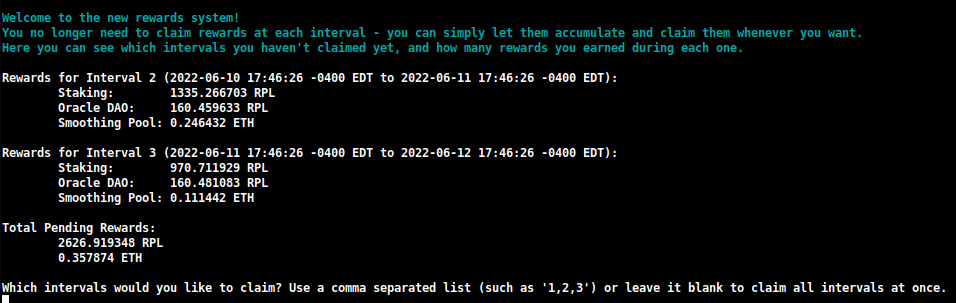
여기에서 각 간격에서 얻은 보상을 빠르게 확인하고 청구할 것을 결정할 수 있습니다.
또한 이 청구 중에 restake하려는 금액을 지정할 수도 있습니다:

이렇게 하면 하나의 트랜잭션으로 RPL 보상을 복리화할 수 있으며, 레거시 청구 시스템에서 현재 사용해야 했던 것보다 훨씬 적은 가스를 사용합니다.
참고
Oracle DAO가 생성한 것을 다운로드하는 대신 보상 checkpoint를 수동으로 작성하려면 TUI에서 이 설정을 Download에서 Generate로 변경할 수 있습니다:
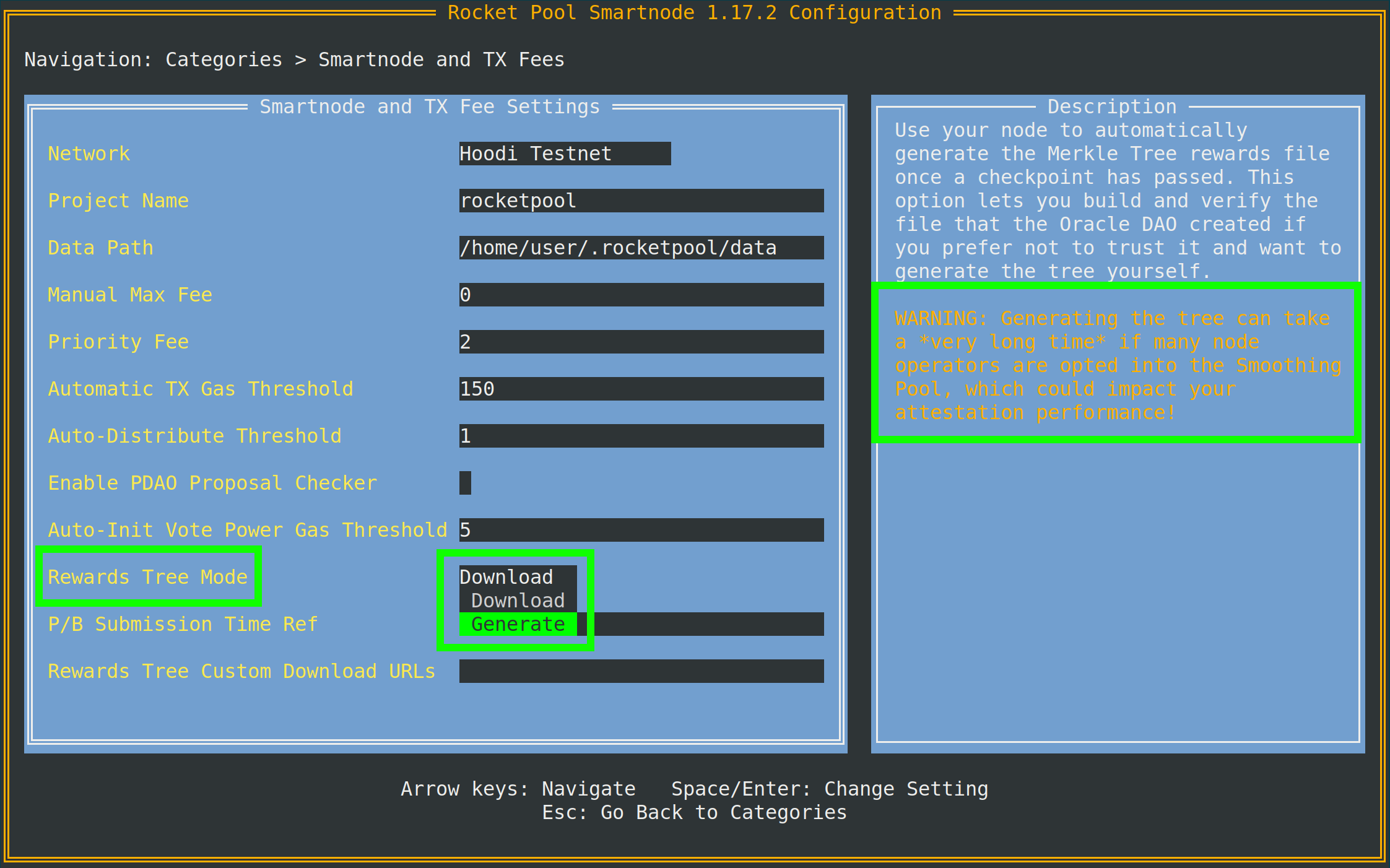
팁에서 알 수 있듯이 이를 수행하려면 Execution 클라이언트 archive node에 액세스해야 합니다.
로컬 Execution 클라이언트가 archive node가 아닌 경우 동일한 메뉴의 Archive-Mode EC URL 더 아래에서 별도의 클라이언트(Infura 또는 Alchemy 등)를 지정할 수 있습니다.
이 URL은 Merkle 트리를 생성할 때만 사용됩니다. validation 작업에는 사용되지 않습니다.
join-smoothing-pool
rocketpool node join-smoothing-pool
이렇게 하면 Rocket Pool 계약에 opt-in으로 기록되고 Validator Client의 fee recipient가 node의 distributor 계약에서 Smoothing Pool 계약으로 자동 변경됩니다.
opt in하면 opt out할 수 있을 때까지 28일의 대기 기간(전체 보상 간격 길이)이 있습니다.
leave-smoothing-pool
rocketpool node leave-smoothing-pool
현재 opt in되어 있고 opt in 후 최소 28일을 기다린 경우 Smoothing Pool에서 opt out됩니다.
현재 epoch 다음 epoch가 완료되면 node의 fee recipient가 Smoothing Pool에서 node의 distributor 계약으로 자동 변경됩니다.
이는 제안이 예정되어 있을 때 exit 프로세스를 front-running하여 페널티를 받지 않도록 하기 위한 것입니다.
distribute-fees
fee distributor에서 보상을 획득한 후 다음 명령을 사용하여 전체 잔액을 청구하고 배포할 수 있습니다:
rocketpool node distribute-fees
이렇게 하면 보상의 몫이 withdrawal 주소로 전송됩니다.
send
이 명령을 사용하면 node 지갑에서 다른 주소로 ETH, RPL 또는 기타 Rocket Pool 관련 토큰을 보낼 수 있습니다.
지갑의 자금을 다른 곳으로 이동하려는 경우 유용할 수 있습니다.
send 명령을 사용하는 구문은 다음과 같습니다:
rocketpool node send <amount> <token> <address or ENS name>
인수는 다음과 같습니다:
<amount>는 보낼 토큰의 양입니다.<token>은 보낼 토큰으로 eth, rpl, fsrpl(이전 레거시 RPL 토큰) 또는 reth일 수 있습니다.<address or ENS name>은 토큰을 보낼 Ethereum 주소(또는 ENS 이름)입니다.
예를 들어:
rocketpool node send 1 eth <my friend's address>
는 친구에게 1 ETH를 보냅니다.
Megapool 명령어
megapool 그룹은 megapool과 megapool validator를 관리하는 데 사용되는 모든 명령에 액세스할 수 있는 곳입니다.
rocketpool megapool help가 보여주는 내용은 다음과 같습니다:
NAME:
   rocketpool megapool - Manage the node's megapool

USAGE:
   rocketpool megapool [global options] command [command options] [arguments...]

VERSION:
   1.19.1

COMMANDS:
   deposit, d                Make a deposit and create a new validator on the megapool. Optionally specify count to make multiple deposits.
   status, s                 Get the node's megapool status
   validators, v             Get a list of the megapool's validators
   repay-debt, r             Repay megapool debt
   reduce-bond, e            Reduce the megapool bond
   claim, c                  Claim any megapool rewards that were distributed but not yet claimed
   stake, k                  Stake a megapool validator
   exit-queue, x             Exit the megapool queue
   dissolve-validator, i     Dissolve a megapool validator
   exit-validator, t         Request to exit a megapool validator
   notify-validator-exit, n  Notify that a validator exit is in progress
   notify-final-balance, f   Notify that a validator exit has completed and the final balance has been withdrawn
   distribute, b             Distribute any accrued execution layer rewards sent to this megapool

GLOBAL OPTIONS:
   --help, -h  show help
다음은 일반 운영 중에 일반적으로 사용하는 명령에 대한 요약입니다:
deposit
이 명령을 사용하면 megapool에 새 validator를 생성할 수 있습니다. 나중에 자세히 다룰 것입니다. 미리 보고 싶다면 Megapool Validator 생성으로 건너뛰어도 됩니다.
status
이 명령은 megapool의 상태와 megapool이 관리하는 validator에 대한 정보를 제공합니다. megapool의 주소, express queue 티켓 수, megapool의 delegate 주소, execution 및 consensus 레이어의 ETH 잔액 및 기타 유용한 정보를 볼 수 있습니다. 다음은 rocketpool megapool status 출력 예시입니다:
=== Megapool ===
The node has a megapool deployed at 0xCf3576c5A6e5a25AC00C9adb6751924BAe1680B1
The node has 0 express ticket(s).
The megapool has 9 validators.

=== Megapool Delegate ===
The megapool is using the latest delegate.
The megapool's effective delegate address is 0x138602A95956995280f1146aA9477d6B4E481B3c
The megapool has automatic delegate upgrades disabled. You can toggle this setting using 'rocketpool megapool set-use-latest-delegate'.

=== Megapool Balance ===
The megapool has 4.000000 node bonded ETH.
The megapool has 28.000000 RP ETH for a total of 32.000000 bonded ETH.
Megapool balance (EL): 32.051883 ETH
The megapool has 1 validators exiting. You'll be able to see claimable rewards once the exit process is completed.
Beacon balance (CL): 0.000000 ETH
Your portion: 0.000000 ETH
Current network commission: 5.000000%
validators
rocketpool megapool validators 명령은 node의 megapool이 관리하는 모든 validator의 상태를 보여줍니다. validator 공개 키, beacon chain 상태, prestaking validator의 queue 위치 등의 정보를 볼 수 있습니다:
There are 8 validator(s) on the express queue.
There are 2 validator(s) on the standard queue.
The express queue rate is 2.

1 Staking validator(s):

Megapool Validator ID:        1
Validator pubkey:             <pubkey>
Validator active:             no
Validator index:              <index>
Beacon status:                pending_queued
Express Ticket Used:          no


1 Initialized validator(s):

--------------------

Megapool Validator ID:        2
Expected pubkey:              <pubkey>
Validator active:             no
Validator Queue Position:     10
Express Ticket Used:          no


1 Exiting validator(s):

--------------------

Megapool Validator ID:        0
Validator pubkey:             <pubkey>
Validator active:             no
Validator index:              <index>
Beacon status:                withdrawal_done
Express Ticket Used:          yes
exit-validator
이 명령을 사용하면 Beacon Chain에서 자발적으로 exit할 validator를 선택할 수 있습니다. validator를 닫고 최종 ETH 잔액을 withdraw하려는 경우 사용하세요. 이는 실행 취소할 수 없습니다 - exit를 트리거하면 validator가 영구적으로 종료됩니다.
Minipool 명령어
minipool 그룹은 minipool에 영향을 미치는 명령과 관련이 있습니다.
node 그룹과 마찬가지로 다음 섹션에서 이에 대해 더 자세히 다룰 것이지만 지금 모두 보는 것이 도움이 될 수 있습니다.
다음은 rocketpool minipool help 출력이 보여주는 내용입니다:
NAME:
   rocketpool minipool - Manage the node's minipools

USAGE:
   rocketpool minipool command [command options] [arguments...]

COMMANDS:
   status, s                  Get a list of the node's minipools
   stake, t                   Stake a minipool after the scrub check, moving it from prelaunch to staking.
   set-withdrawal-creds, swc  Convert the withdrawal credentials for a migrated solo validator from the old 0x00 value to the minipool address. Required to complete the migration process.
   import-key, ik             Import the externally-derived key for a minipool that was previously a solo validator, so the Smart Node's VC manages it instead of your externally-managed VC.
   promote, p                 Promote a vacant minipool after the scrub check, completing a solo validator migration.
   refund, r                  Refund ETH belonging to the node from minipools
   begin-bond-reduction, bbr  Begins the ETH bond reduction process for a minipool, taking it from 16 ETH down to 8 ETH (begins conversion of a 16 ETH minipool to an LEB8)
   reduce-bond, rb            Manually completes the ETH bond reduction process for a minipool from 16 ETH down to 8 ETH once it is eligible. Please run `begin-bond-reduction` first to start this process.
   distribute-balance, d      Distribute a minipool's ETH balance between your withdrawal address and the rETH holders.
   exit, e                    Exit staking minipools from the beacon chain
   close, c                   Withdraw any remaining balance from a minipool and close it
   delegate-upgrade, u        Upgrade a minipool's delegate contract to the latest version
   find-vanity-address, v     Search for a custom vanity minipool address
   rescue-dissolved, rd       Manually deposit ETH into the Beacon deposit contract for a dissolved minipool, activating it on the Beacon Chain so it can be exited.

OPTIONS:
   --help, -h  show help
다음은 일반적으로 사용하는 명령에 대한 요약입니다.
status
이 명령은 각 minipool의 요약을 제공합니다.
여기에는 현재 상태, minipool의 eth1 주소, 수수료(node fee라고 함), 해당 ETH2 validator의 공개 키 및 기타 몇 가지가 포함됩니다:
$ rocketpool minipool status

1 Staking minipool(s):

--------------------

Address:                <minipool eth1 address>
Penalties:             0
Status updated:        2025-07-15, 08:31 +0000 UTC
Node fee:              5.000000%
Node deposit:          8.000000 ETH
RP ETH assigned:       2025-07-14, 20:26 +0000 UTC
RP deposit:            24.000000 ETH
Minipool Balance (EL): 0.064202 ETH
Your portion:          0.018458 ETH
Available refund:      0.000000 ETH
Total EL rewards:      0.018458 ETH
Validator pubkey:      <validator eth2 address>
Validator index:       <validator eth2 index>
Validator active:      yes
Beacon balance (CL):   32.000347 ETH
Your portion:          8.000099 ETH
Use latest delegate:   no
Delegate address:      0x56903694d881282D33ed0643EAe14263880Dd47F
Rollback delegate:     <none>
Effective delegate:    0x56903694d881282D33ed0643EAe14263880Dd47F
refund
이 명령을 사용하면 minipool을 생성하기 위해 32 ETH를 입금한 경우 rETH staking pool에서 Rocket Pool이 16 ETH를 기여할 수 있게 되면 minipool에서 16 ETH를 되찾을 수 있습니다.
exit
이 명령은 Beacon Chain에서 validator에 대한 자발적 exit를 제출합니다.
validator를 닫고 최종 ETH 잔액을 withdraw하려는 경우 사용하세요.
이는 실행 취소할 수 없습니다 - exit를 트리거하면 validator가 영구적으로 종료됩니다.
유용한 플래그
위의 일부 명령에 추가할 수 있는 유용한 전역 플래그가 몇 가지 있으며 활용할 수 있습니다.
사용자 정의 Max Fee 또는 Priority Fee(가스 가격) 설정
2021년 7월 London ETH1 hardfork 이후 Ethereum 트랜잭션은 더 이상 단일 가스 가격을 사용하지 않습니다.
대신 최신 Ethereum 트랜잭션은 두 가지 값을 사용합니다:
- max fee는 트랜잭션에서 수락할 의사가 있는 절대 최대 가스 가격을 설명합니다
- max priority fee는 블록에 트랜잭션을 포함시키기 위해 채굴자에게 "팁"으로 기꺼이 지불할 최대 금액을 설명합니다
팁
이 두 값이 작동하는 방식은 다소 복잡할 수 있으므로 다음은 몇 가지 간단한 예입니다.
현재 네트워크 수수료(base fee라고 함)가 50 gwei라고 가정해 보겠습니다.
80 gwei max fee와 2 gwei priority fee로 트랜잭션을 제출합니다.
네트워크의 base fee가 max fee보다 낮기 때문에 이 트랜잭션은 현재 블록에 포함될 수 있습니다.
base fee로 50 gwei, priority fee로 2 gwei가 소요됩니다. max fee를 80으로 설정했지만 총 52 gwei만 소요됩니다.
또 다른 예로, 동일한 트랜잭션이 있지만 이제 네트워크의 base fee가 100 gwei라고 가정해 보겠습니다.
100 gwei가 80 gwei max fee보다 크기 때문에 트랜잭션이 이 블록에 포함되지 않습니다.
대신 base fee가 충분히 낮아질 때까지 트랜잭션 pool에 단순히 머물게 됩니다.
이제 현재 base fee가 다시 50 gwei이고 트랜잭션의 max fee가 80 gwei이고 priority fee가 4 gwei라고 가정해 보겠습니다.
총 비용 54 gwei로 실행됩니다.
4 gwei priority fee는 priority fee가 낮은 모든 트랜잭션보다 앞서 포함되도록 합니다.
무슨 수를 써서라도 트랜잭션이 진행되기를 정말로 원한다면 priority fee를 max fee와 동일하게 설정할 수 있습니다.
이것은 레거시 가스 동작을 에뮬레이트하므로 네트워크의 base fee가 max fee보다 낮든 아니든 관계없이 트랜잭션이 제공한 모든 가스를 사용합니다.
기본적으로 Rocket Pool은 oracle을 사용하여 현재 트랜잭션 pool을 확인하고 트리거하는 모든 트랜잭션에 대해 합리적인 max fee를 제안합니다.
기본 제안 oracle로 EtherChain을 사용하고 백업으로 Etherscan을 사용합니다.
원하는 경우 -f 플래그를 사용하여 지불할 의사가 있는 사용자 정의 max fee(gwei 단위)를 설정할 수 있습니다.
또한 -i 플래그를 사용하여 사용자 정의 priority fee를 설정할 수 있습니다.
이렇게 하려면 rocketpool 뒤와 다른 명령 정보 앞에 추가하세요.
예를 들어, 이 플래그와 함께 node set-timezone을 호출하면 다음 출력이 제공됩니다:
$ rocketpool -f 10 node set-timezone

Would you like to detect your timezone automatically? [y/n]
n

Please enter a timezone to register with in the format 'Country/City':
Australia/Brisbane

You have chosen to register with the timezone 'Australia/Brisbane', is this correct? [y/n]
y

Using the requested max fee of 10.00 gwei (including a max priority fee of 2.00 gwei).
Total cost: 0.0005 to 0.0007 ETH
Are you sure you want to set your timezone? [y/n]
이것은 네트워크가 권장하는 max fee가 무엇이든 관계없이 이 트랜잭션을 제출할 때 사용자 정의 max fee 10 gwei(및 지정한 경우 priority fee)를 대신 사용함을 보여줍니다.
참고
수동 max fee를 설정하는 경우 트랜잭션을 제출하기 전에 EtherChain과 같은 타사 가스 가격 oracle을 사용하여 해당 수수료가 현재 네트워크 조건에 충분한지 확인하는 것이 좋습니다.
막힌 트랜잭션 취소/덮어쓰기
때때로 네트워크에 트랜잭션을 보냈지만 현재 네트워크 조건에 비해 너무 낮은 가스 가격을 사용하여 실행하는 데 엄청나게 오래 걸리는 시나리오가 발생할 수 있습니다.
모든 후속 트랜잭션은 해당 트랜잭션이 완료될 때까지 대기하므로 해당 트랜잭션은 기본적으로 Rocket Pool node의 모든 작업을 차단합니다.
이러한 상황을 처리하기 위해 이러한 트랜잭션을 다른 것으로 대체하여 "취소"할 수 있는 전역 플래그를 추가했습니다.
node 지갑을 포함한 모든 Ethereum 지갑은 트랜잭션을 순차적으로 보냅니다.
보내는 각 트랜잭션에는 해당 시퀀스에서 위치를 식별하는 nonce라는 번호가 있습니다.
보내는 첫 번째 트랜잭션의 nonce는 0이고, 다음에 보내는 트랜잭션의 nonce는 1이 됩니다.
이 덮어쓰기 기술은 기존 막힌 트랜잭션과 동일한 nonce를 사용하는 새 트랜잭션을 보내지만 이상적으로는 막힌 트랜잭션보다 높은 가스 가격을 포함하는 것입니다.
이는 새 트랜잭션이 먼저 채굴됨을 의미합니다.
블록에 채굴되는 즉시 이전 트랜잭션은 전혀 전송되지 않은 것처럼 네트워크에서 폐기됩니다.
이 플래그를 사용하려면 먼저 막힌 트랜잭션의 nonce를 찾아야 합니다:
- https://etherscan.io와 같은 ETH1 블록 탐색기로 이동합니다.
- 지갑 주소로 이동하여 트랜잭션 목록을 확인합니다.
- 가장 최근 것부터 시작하여
Pending 상태인 목록에서 가장 아래에 있는 것을 찾을 때까지 살펴봅니다.
- 해당 트랜잭션의
nonce를 표시합니다. 이것이 필요한 것입니다.
일단 있으면 rocketpool 뒤와 나머지 명령 앞에 --nonce <value> -i 2.2 플래그를 사용하여 CLI로 모든 트랜잭션을 호출하기만 하면 됩니다.
참고
이전 트랜잭션을 덮어쓰려면 -i(priority fee) 플래그를 반드시 포함해야 합니다.
이 숫자는 이전 트랜잭션이 사용한 priority fee보다 최소 10% 높아야 합니다.
Smartnode는 기본적으로 2 gwei의 priority fee를 사용하므로 일반적으로 재정의에는 2.2 값이면 충분합니다.
이전 트랜잭션이 사용자 정의 수수료(예: 10 gwei)를 사용한 경우 재정의 트랜잭션에서 최소 10% 더 높게 설정해야 합니다(이 예에서는 11 gwei).
예를 들어, nonce 10과 max fee 20 gwei로 트랜잭션을 제출했지만 현재 네트워크 수수료가 100 gwei이므로 트랜잭션이 막혔다고 가정해 보겠습니다.
이를 수정하기 위해 더 높은 max fee(예: 150 gwei)와 더 높은 priority fee로 자신에게서 자신에게로 소량의 ETH를 보내는 트랜잭션을 제출할 것입니다.
약간의 가스를 소모하지만 막힌 트랜잭션을 풀어줍니다:
$ rocketpool --nonce 10 -f 150 -i 2.2 node send 0.0001 eth <node wallet address>

Using the requested max fee of 150.00 gwei (including a max priority fee of 2.20 gwei).
Total cost: 0.0032 to 0.0032 ETH
Are you sure you want to send 0.000100 eth to <node wallet address>? This action cannot be undone! [y/n]
Smartnode 스택은 제공한 nonce가 유효한지(보류 중인 트랜잭션을 참조하는지) 자동으로 확인한 후 전송하여 실수로 가스를 낭비하지 않도록 합니다.
그렇지 않으면 오류 메시지가 반환됩니다.
그렇지 않으면 계속 진행되어 트랜잭션 세부 정보가 제공되므로 모니터링하여 실제로 이전의 막힌 트랜잭션을 덮어썼는지 확인할 수 있습니다.
일반적인 CLI 명령은 여기까지입니다.
다음 섹션에서는 minipool을 생성하고 Beacon Chain에서 validation을 시작하는 방법을 안내합니다.