命令行界面简介
作为节点运营者,CLI 是您与 Rocket Pool 交互的主要工具。
您将使用它来创建新的 minipool,检查所有状态,领取定期的 RPL 奖励,在准备好时从 minipool 退出和提取,以及执行许多其他活动。
一旦您完成了 Execution 和 Beacon 链的同步,所有命令就都可供您使用了。
在本节中,我们将简要介绍一些较常用的命令以及 CLI 可以执行的其他一些技巧。
了解命令
要列出所有可用命令,输入:
输出将如下所示:
______           _        _    ______           _
| ___ \         | |      | |   | ___ \         | |
| |_/ /___   ___| | _____| |_  | |_/ /__   ___ | |
|    // _ \ / __| |/ / _ \ __| |  __/ _ \ / _ \| |
| |\ \ (_) | (__|   <  __/ |_  | | | (_) | (_) | |
\_| \_\___/ \___|_|\_\___|\__| \_|  \___/ \___/|_|

Authored by the Rocket Pool Core Team
A special thanks to the Rocket Pool community for all their contributions.

NAME:
   rocketpool - Rocket Pool CLI

USAGE:
   rocketpoolcli [global options] command [command options] [arguments...]

VERSION:
   1.19.1

COMMANDS:
   auction, a   Manage Rocket Pool RPL auctions
   claims, l    View and claim all available rewards and credits across the node
   minipool, m  Manage the node's minipools
   megapool, g  Manage the node's megapool
   network, e   Manage Rocket Pool network parameters
   node, n      Manage the node
   odao, o      Manage the Rocket Pool oracle DAO
   pdao, p      Manage the Rocket Pool Protocol DAO
   queue, q     Manage the Rocket Pool deposit queue
   security, c  Manage the Rocket Pool security council
   service, s   Manage Rocket Pool service
   wallet, w    Manage the node wallet
   help, h      Shows a list of commands or help for one command

GLOBAL OPTIONS:
   --allow-root, -r              Allow rocketpool to be run as the root user
   --config-path path, -c path   Rocket Pool config asset path (default: "~/.rocketpool")
   --daemon-path path, -d path   Interact with a Rocket Pool service daemon at a path on the host OS, running outside of docker
   --maxFee value, -f value      The max fee (including the priority fee) you want a transaction to cost, in gwei (default: 0)
   --maxPrioFee value, -i value  The max priority fee you want a transaction to use, in gwei (default: 0)
   --gasLimit value, -l value    [DEPRECATED] Desired gas limit (default: 0)
   --nonce value                 Use this flag to explicitly specify the nonce that this transaction should use, so it can override an existing 'stuck' transaction
   --debug                       Enable debug printing of API commands
   --secure-session, -s          Some commands may print sensitive information to your terminal. Use this flag when nobody can see your screen to allow sensitive data to be printed without prompting
   --help, -h                    show help
   --version, -v                 print the version

COPYRIGHT:
   (c) 2026 Rocket Pool Pty Ltd
Service 命令
service 组涉及管理 Smart Node 为您管理的各种服务。
以下是 rocketpool service help 输出将显示的内容:
NAME:
   rocketpool service - Manage Rocket Pool service

USAGE:
   rocketpool service [global options] command [command options] [arguments...]

VERSION:
   1.19.1

COMMANDS:
   install, i                 Install the Rocket Pool service
   config, c                  Configure the Rocket Pool service
   status, u                  View the Rocket Pool service status
   start, s                   Start the Rocket Pool service
   pause, p                   Pause the Rocket Pool service
   stop, o                    Pause the Rocket Pool service (alias of 'rocketpool service pause')
   reset-docker, rd           Cleanup Docker resources, including stopped containers, unused images and networks. Stops and restarts Smart Node.
   prune-docker, pd           Cleanup unused Docker resources, including stopped containers, unused images, networks and volumes. Does not restart smartnode, so the running containers and the images and networks they reference will not be pruned.
   logs, l                    View the Rocket Pool service logs
   stats, a                   (DEPRECATED) No longer supported. Use 'docker stats -a' instead
   compose                    View the Rocket Pool service docker compose config
   version, v                 View the Rocket Pool service version information
   prune-eth1, n              Shuts down the main ETH1 client and prunes its database, freeing up disk space, then restarts it when it's done.
   install-update-tracker, d  Install the update tracker that provides the available system update count to the metrics dashboard
   get-config-yaml            Generate YAML that shows the current configuration schema, including all of the parameters and their descriptions
   resync-eth1                Deletes the main ETH1 client's chain data and resyncs it from scratch. Only use this as a last resort!
   resync-eth2                Deletes the ETH2 client's chain data and resyncs it from scratch. Only use this as a last resort!
   terminate, t               Deletes all of the Rocket Pool Docker containers and volumes, including your ETH1 and ETH2 chain data and your Prometheus database (if metrics are enabled). Also removes your entire `.rocketpool` configuration folder, including your wallet, password, and validator keys. Only use this if you are cleaning up the Smart Node and want to start over!

GLOBAL OPTIONS:
   --compose-file value, -f value  Optional compose files to override the standard Rocket Pool docker compose YAML files; this flag may be defined multiple times
   --help, -h                      show help
status
此命令显示 Rocket Pool 管理的每个 Docker 容器的当前运行状态。
例如,默认 Docker 安装的输出如下所示:
        Name                       Command              State                                                       Ports
------------------------------------------------------------------------------------------------------------------------------------------------------------------------------
rocketpool_api          /bin/sleep infinity             Up
rocketpool_eth1         sh /setup/start-node.sh         Up      0.0.0.0:30303->30303/tcp,:::30303->30303/tcp, 0.0.0.0:30303->30303/udp,:::30303->30303/udp, 8545/tcp, 8546/tcp
rocketpool_eth2         sh /setup/start-beacon.sh       Up      0.0.0.0:9001->9001/tcp,:::9001->9001/tcp, 0.0.0.0:9001->9001/udp,:::9001->9001/udp
rocketpool_node         /go/bin/rocketpool node         Up
rocketpool_validator    sh /setup/start-validator.sh    Up
rocketpool_watchtower   /go/bin/rocketpool watchtower   Up
您可以使用它快速检查任何 Docker 容器是否出现问题,或确保 start 或 stop 命令正确执行。
start 和 stop
这两个命令您已经很熟悉了。
它们只是启动或停止所有 Rocket Pool 容器。
Tip
pause 命令与 stop 做同样的事情。
它只是作为 Rocket Pool 早期版本的遗留命令保留下来的。
logs
这是另一个您应该已经见过的命令。
您可以使用它查看每个 Docker 容器的输出日志。
这对于故障排除或从它们那里获取更详细的状态报告很有用。
如果您只是执行 rocketpool service logs 而没有任何其他参数,它将汇总所有日志并一次性显示给您。
如果您想专注于一个容器的输出,可以在末尾添加一个参数来指定容器。
有效值为 eth1、eth2、validator、api、node、watchtower、prometheus、grafana 和 node-exporter。
stats
此命令显示每个容器的一些资源统计信息,您可以使用它来分析每个容器的硬件和网络消耗。
如果您的系统开始运行缓慢或出现 RAM 问题,您可能会发现它对监控容器很有用。
以下是一些示例输出:
CONTAINER ID   NAME                    CPU %     MEM USAGE / LIMIT     MEM %     NET I/O           BLOCK I/O         PIDS
62314e5a0ecf   rocketpool_api          0.00%     18.89MiB / 62.78GiB   0.03%     50.6kB / 31.1kB   57.4MB / 0B       1
ac629c08c896   rocketpool_eth1         5.44%     18.13GiB / 62.78GiB   28.88%    1.63GB / 1.66GB   24.4GB / 37.7GB   27
4dfc7a2e939b   rocketpool_eth2         97.39%    2.369GiB / 62.78GiB   3.77%     1.79GB / 45MB     333MB / 24.1GB    2
a3c22f54eff0   rocketpool_node         0.00%     12.13MiB / 62.78GiB   0.02%     308kB / 504kB     0B / 0B           15
0d5818868ef6   rocketpool_validator    0.00%     936KiB / 62.78GiB     0.00%     12.1kB / 0B       4.57MB / 0B       2
88bea525fa89   rocketpool_watchtower   0.00%     12.05MiB / 62.78GiB   0.02%     304kB / 503kB     0B / 0B           16
注意
这里的 RAM 统计显示的是总分配内存,其中包括虚拟内存。
它不显示原始的常驻内存消耗。
类似地,CPU 使用率显示的是容器使用的所有 CPU 核心的平均总 CPU 消耗。
在这里,ETH2 的 CPU 显示接近 100%,因为它使用的是 Nimbus,这是单线程的。
您可能会发现像 htop 或 btop 这样的程序能更好地洞察实际的资源消耗。
config
此命令再次运行配置访谈。
如果您想更改 Execution 或 Consensus 客户端的选择,或更改您最初选择它们时指定的某些参数(例如验证者的涂鸦消息、要连接的最大对等节点数等),您可以使用它。
您可以随时调用此命令,但更改要到您调用 rocketpool service stop 和 rocketpool service start 后才会生效。
terminate
此命令将关闭 Docker 容器,然后删除它们、删除 Rocket Pool 虚拟网络,并删除 ETH1 和 ETH2 链数据卷。
它基本上从您的 Docker 设置中删除所有 Rocket Pool 项目。
当您想清理 Rocket Pool 安装的那部分时使用它。
Warning
这将不可逆转地删除您的链数据,这意味着您需要再次同步 ETH1 和 ETH2。
这不会删除您的钱包和密码文件、您配置的设置或您的验证者密钥。
要删除这些,您需要删除 Docker 或混合模式下的 ~/.rocketpool/data 文件夹,或原生模式下的相应目录。
Node 命令
node 组涉及对您的 Rocket Pool 节点的操作。
我们将在下一节中更深入地介绍这些,在那里我们将创建一个 minipool,但现在一目了然地查看它们可能会有所帮助。
以下是 rocketpool node help 输出将显示的内容:
NAME:
   rocketpool node - Manage the node

USAGE:
   rocketpool node command [command options] [arguments...]

COMMANDS:
   status, s                                     Get the node's status
   sync, y                                       Get the sync progress of the eth1 and eth2 clients
   register, r                                   Register the node with Rocket Pool
   rewards, e                                    Get the time and your expected RPL rewards of the next checkpoint
   set-primary-withdrawal-address, w             Set the node's primary withdrawal address, which will receive all ETH rewards (and RPL if the RPL withdrawal address is not set)
   confirm-primary-withdrawal-address, f         Confirm the node's pending primary withdrawal address if it has been set back to the node's address itself
   set-rpl-withdrawal-address, srwa              Set the node's RPL withdrawal address, which will receive all RPL rewards and staked RPL withdrawals
   confirm-rpl-withdrawal-address, crwa          Confirm the node's pending rpl withdrawal address if it has been set back to the node's address itself
   allow-rpl-locking, arl                        Allow the node to lock RPL when creating governance proposals/challenges
   deny-rpl-locking, drl                         Do not allow the node to lock RPL when creating governance proposals/challenges
   set-timezone, t                               Set the node's timezone location
   swap-rpl, p                                   Swap old RPL for new RPL
   stake-rpl, k                                  Stake RPL against the node
   add-address-to-stake-rpl-whitelist, asw       Adds an address to your node's RPL staking whitelist, so it can stake RPL on behalf of your node.
   remove-address-from-stake-rpl-whitelist, rsw  Removes an address from your node's RPL staking whitelist, so it can no longer stake RPL on behalf of your node.
   claim-rewards, c                              Claim available RPL and ETH rewards for any checkpoint you haven't claimed yet
   withdraw-rpl, i                               Withdraw RPL staked against the node
   withdraw-eth, h                               Withdraw ETH staked on behalf of the node
   withdraw-credit, wc                           (Saturn) Withdraw ETH credit from the node as rETH
   deposit, d                                    Make a deposit and create a minipool
   create-vacant-minipool, cvm                   Create an empty minipool, which can be used to migrate an existing solo staking validator as part of the 0x00 to 0x01 withdrawal credentials upgrade
   send, n                                       Send ETH or tokens from the node account to an address. ENS names supported. Use 'all' as the amount to send the entire balance. <token> can be 'rpl', 'eth', 'fsrpl' (for the old RPL v1 token), 'reth', or the address of an arbitrary token you want to send (including the 0x prefix).
   set-voting-delegate, sv                       (DEPRECATED) Use `rocketpool pdao set-signalling-address` instead
   clear-voting-delegate, cv                     (DEPRECATED) Use `rocketpool pdao clear-signalling-address` instead
   initialize-fee-distributor, z                 Create the fee distributor contract for your node, so you can withdraw priority fees and MEV rewards after the merge
   distribute-fees, b                            Distribute the priority fee and MEV rewards from your fee distributor to your withdrawal address and the rETH contract (based on your node's average commission)
   join-smoothing-pool, js                       Opt your node into the Smoothing Pool
   leave-smoothing-pool, ls                      Leave the Smoothing Pool
   sign-message, sm                              Sign an arbitrary message with the node's private key
   send-message                                  Send a zero-ETH transaction to the target address (or ENS) with the provided hex-encoded message as the data payload
   claim-unclaimed-rewards, cur                  Sends any unclaimed rewards to the node's withdrawal address
   provision-express-tickets, pet                Provision the node's express tickets

OPTIONS:
   --help, -h  show help
以下是您在典型节点操作期间往往需要的一些命令的摘要。
status
此命令将让您一目了然地查看整个节点的高级视图。
它包括您质押了多少 ETH 和 RPL、您有多少个 minipool 以及它们的状态、您的 RPL 抵押率等等。
这是一个示例,显示了一旦您注册了节点并设置了一些 minipool 后 rocketpool node status 的内容:
=== Account and Balances ===
The node 0x4d19DE4A5a1B1B36EBaB3D5c32C01061fbDE328d has a balance of 49.402553 ETH and 0.000000 RPL.
The node has 0.000000 ETH in its credit balance and 0.000000 ETH staked on its behalf. 0.000000 can be used to make new validators.
The node is registered with Rocket Pool with a timezone location of America/Los_Angeles.

=== Megapool ===
The node has a megapool deployed at 0xCf3576c5A6e5a25AC00C9adb6751924BAe1680B1.
The megapool has 9 validators.
The node has 0 express queue ticket(s).

=== Penalty Status ===
The node does not have any penalties for cheating with an invalid fee recipient.

=== Signalling on Snapshot ===
The node does not currently have a snapshot signalling address set.
To learn more about snapshot signalling, please visit https://docs.rocketpool.net/pdao/participate#setting-your-snapshot-signalling-address.
Rocket Pool has no Snapshot governance proposals being voted on.

=== Onchain Voting ===
The node doesn't have a delegate, which means it can vote directly on onchain proposals. You can have another node represent you by running `rocketpool p svd <address>`.
The node is NOT allowed to lock RPL to create governance proposals/challenges.

=== Primary Withdrawal Address ===
The node's primary withdrawal address has not been changed, so ETH rewards and minipool withdrawals will be sent to the node itself.
Consider changing this to a cold wallet address that you control using the `set-withdrawal-address` command.

=== RPL Withdrawal Address ===
The node's RPL withdrawal address has not been set. All RPL rewards will be sent to the primary withdrawal address.

=== Fee Distributor and Smoothing Pool ===
The node's fee distributor 0x84c1f488CDecb2E335c40901E3Fe58925f4cC9A7 has a balance of 0.004897 ETH.
NOTE: You are in Native Mode; you MUST ensure that your Validator Client is using this address as its fee recipient!
The node is not opted into the Smoothing Pool.
To learn more about the Smoothing Pool, please visit https://docs.rocketpool.net/upgrades/redstone/whats-new#smoothing-pool.
You have 3 minipools that would earn extra commission if you opted into the smoothing pool!
See https://rpips.rocketpool.net/RPIPs/RPIP-62 for more information about bonus commission, or run `rocketpool node join-smoothing-pool` to opt in.

=== RPL Stake ===
NOTE: The following figures take *any pending bond reductions* into account.

The node has a total stake of 20000.000000 RPL.
This is currently 3.74% of its borrowed ETH and 30.06% of its bonded ETH.
The node has 0.000000 megapool staked RPL.
The node has 20000.000000 legacy staked RPL.
The node has a total stake (legacy minipool RPL plus megapool RPL) of 20000.000000 RPL.
You have 0.000000 RPL staked on your megapool and can request to unstake up to 0.000000 RPL

=== Minipools ===
The node has a total of 3 active minipool(s):
- 3 staking
sync
此命令将显示您的 Execution 和 Consensus 客户端的当前同步状态。
您可能会在首次设置节点时经常使用它,然后再也不需要它(除非您更改或重置客户端)。
rocketpool node sync 的输出将如下所示:
Your Smartnode is currently using the Hoodi Test Network.

Your eth1 client hasn't synced enough to determine if your eth1 and eth2 clients are on the same network.
To run this safety check, try again later when eth1 has made more sync progress.

Your primary execution client is still syncing (67.12%).
You do not have a fallback execution client enabled.
Your primary consensus client is still syncing (99.94%).
You do not have a fallback consensus client enabled.
请注意,Prysm 目前不提供其完成百分比 - 如果您使用它,您需要查看 eth2 日志。
stake-rpl
当您想向节点添加更多 RPL 抵押品时,您将使用此命令。
这样做将增加您的抵押率,这将增加您在每个检查点的 RPL 奖励(稍后会详细介绍)。
与目前为止的其他命令不同,这个命令实际上是交互式的,因为它将触发一个交易 - 它不仅仅是信息性的。
它首先会问您想质押多少 RPL,提供一些预定义的选项以方便使用,或者允许您指定自定义金额:
NOTE: By staking RPL, you become a member of the Rocket Pool pDAO. Stay informed on governance proposals by joining the Rocket Pool Discord.

Please choose an amount of RPL to stake:
1: 5% of borrowed ETH (733.993926 RPL) for one validator?
2: 10% of borrowed ETH (1467.987852 RPL) for one validator?
3: 15% of borrowed ETH (2201.981778 RPL) for one validator?
4: Your entire RPL balance (20000.000000 RPL)?
5: A custom amount
一旦您选择了一个选项,您将看到有关建议的 gas 价格和预计使用量的一些信息,以及确认对话框。如果这是您第一次在节点上质押 RPL,您需要授予质押合约与您的 RPL 交互的权限:
Before staking RPL, you must first give the staking contract approval to interact with your RPL.
This only needs to be done once for your node.
+============== Suggested Gas Prices ==============+
| Avg Wait Time |  Max Fee  |    Total Gas Cost    |
| 15 Seconds    | 4 gwei    | 0.0001 to 0.0001 ETH |
| 1 Minute      | 4 gwei    | 0.0001 to 0.0001 ETH |
| 3 Minutes     | 4 gwei    | 0.0001 to 0.0001 ETH |
| >10 Minutes   | 4 gwei    | 0.0001 to 0.0001 ETH |
+==================================================+

These prices include a maximum priority fee of 2.00 gwei.
Please enter your max fee (including the priority fee) or leave blank for the default of 4 gwei:

Using a max fee of 4.00 gwei and a priority fee of 2.00 gwei.
Do you want to let the staking contract interact with your RPL? [y/n]
y

Approving RPL for staking...
Transaction has been submitted with hash <transaction hash>.
You may follow its progress by visiting:
https://hoodi.etherscan.io/tx/<transaction hash>

Waiting for the transaction to be included in a block... you may wait here for it, or press CTRL+C to exit and return to the terminal.

Successfully approved staking access to RPL.
RPL Stake Gas Info:
+============== Suggested Gas Prices ==============+
| Avg Wait Time |  Max Fee  |    Total Gas Cost    |
| 15 Seconds    | 4 gwei    | 0.0005 to 0.0007 ETH |
| 1 Minute      | 4 gwei    | 0.0005 to 0.0007 ETH |
| 3 Minutes     | 4 gwei    | 0.0005 to 0.0007 ETH |
| >10 Minutes   | 4 gwei    | 0.0005 to 0.0007 ETH |
+==================================================+

These prices include a maximum priority fee of 2.00 gwei.
Please enter your max fee (including the priority fee) or leave blank for the default of 4 gwei:

Using a max fee of 4.00 gwei and a priority fee of 2.00 gwei.
Are you sure you want to stake 733.993925 RPL? You will not be able to unstake this RPL until you exit your validators and close your minipools, or reach 2201.981777 staked RPL (15% of bonded eth)! [y/n]
如果您确认,您将看到交易哈希并获得一个指向 Etherscan 的链接,以便您可以跟踪其进度:
Staking RPL...
Transaction has been submitted with hash <transaction hash>.
You may follow its progress by visiting:
https://hoodi.etherscan.io/tx/<transaction hash>

Waiting for the transaction to be included in a block... you may wait here for it, or press CTRL+C to exit and return to the terminal.

Successfully staked 733.993925 RPL.
大多数操作只需要一个交易,因此 CLI 将等待直到它被包含在一个区块中,然后退出。但是,stake-rpl 是少数需要两个交易的命令之一,因此此对话框将出现两次。
claim-rewards
当您的节点检测到新的奖励检查点时,它将自动下载该区间的奖励树文件(如果您使用默认的下载模式 - 请参阅下文以了解有关生成您自己的树而不是下载它们的信息)。
然后,您可以使用以下命令查看您的奖励:
rocketpool node claim-rewards
随着区间的推移和奖励的累积,输出将如下所示:
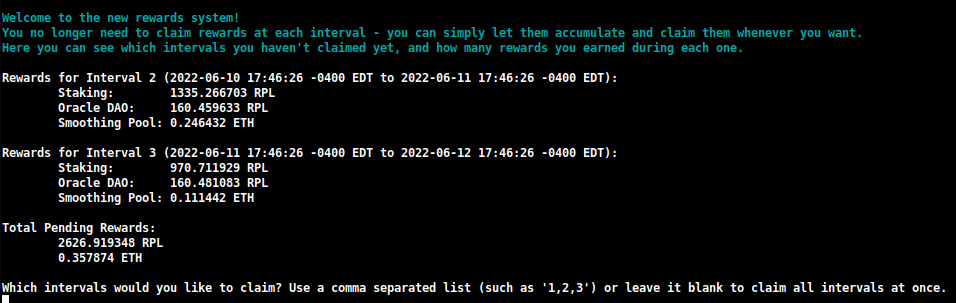
在这里,您可以快速查看您在每个区间获得了多少奖励,并可以决定要领取哪些奖励。
您还可以指定在此次领取期间要重新质押的金额:

这将允许您在一次交易中复利您的 RPL 奖励,使用的 gas 大大少于您目前使用旧版领取系统所需的 gas。
注意
如果您更喜欢手动构建奖励检查点而不是下载由 Oracle DAO 创建的检查点,您可以在 TUI 中将此设置从 Download 更改为 Generate:
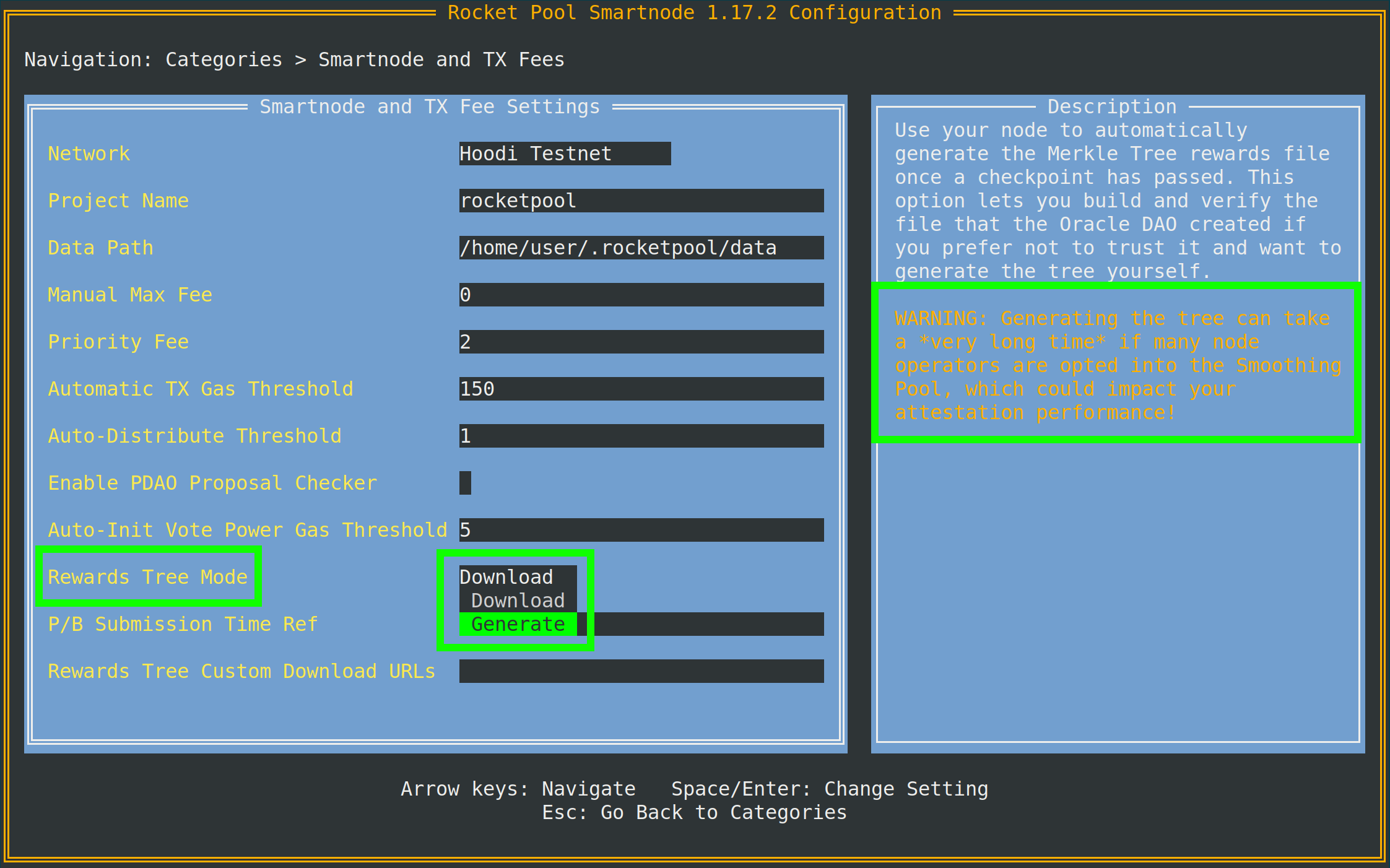
如提示所示,您需要访问 Execution 客户端存档节点才能执行此操作。
如果您的本地 Execution 客户端不是存档节点,您可以在同一菜单中进一步指定一个单独的节点(例如 Infura 或 Alchemy)的 Archive-Mode EC URL。
此 URL 仅在生成 Merkle 树时使用;它不会用于验证职责。
join-smoothing-pool
rocketpool node join-smoothing-pool
这将在 Rocket Pool 合约中记录您为已选择加入,并自动将您的 Validator Client 的 fee recipient 从您节点的分配器合约更改为 Smoothing Pool 合约。
请注意,一旦您选择加入,有一个 28 天冷却期(一个完整的奖励区间长度)才能选择退出。
leave-smoothing-pool
rocketpool node leave-smoothing-pool
如果您当前已选择加入并且已等待至少 28 天,这将使您退出 Smoothing Pool。
一旦当前纪元之后的下一个纪元被最终确定,它将自动将您节点的 fee recipient 从 Smoothing Pool 更改回您节点的分配器合约。
这是为了确保当您看到即将有提案时,您不会因为提前退出过程而受到惩罚。
distribute-fees
当您的分配器已积累奖励后,您可以使用以下命令领取并分配其全部余额:
rocketpool node distribute-fees
这将把您的奖励份额发送到您的提现地址。
send
此命令允许您从节点钱包向不同地址发送 ETH、RPL 或其他 Rocket Pool 相关代币。
如果您想将钱包上的资金转移到其他地方,这可能会很有用。
使用 send 命令的语法如下:
rocketpool node send <amount> <token> <address or ENS name>
参数如下:
<amount> 是要发送的代币数量。<token> 是要发送的代币 - 可以是 eth、rpl、fsrpl(旧的遗留 RPL 代币)或 reth。<address or ENS name> 是要将代币发送到的 Ethereum 地址(或 ENS 名称)。
例如:
rocketpool node send 1 eth <my friend's address>
将向我的朋友发送 1 ETH。
Megapool 命令
megapool 组是您可以访问用于管理 megapool 和 megapool 验证者的所有命令的地方。
以下是 rocketpool megapool help 将显示的内容:
NAME:
   rocketpool megapool - Manage the node's megapool

USAGE:
   rocketpool megapool [global options] command [command options] [arguments...]

VERSION:
   1.19.1

COMMANDS:
   deposit, d                Make a deposit and create a new validator on the megapool. Optionally specify count to make multiple deposits.
   status, s                 Get the node's megapool status
   validators, v             Get a list of the megapool's validators
   repay-debt, r             Repay megapool debt
   reduce-bond, e            Reduce the megapool bond
   claim, c                  Claim any megapool rewards that were distributed but not yet claimed
   stake, k                  Stake a megapool validator
   exit-queue, x             Exit the megapool queue
   dissolve-validator, i     Dissolve a megapool validator
   exit-validator, t         Request to exit a megapool validator
   notify-validator-exit, n  Notify that a validator exit is in progress
   notify-final-balance, f   Notify that a validator exit has completed and the final balance has been withdrawn
   distribute, b             Distribute any accrued execution layer rewards sent to this megapool

GLOBAL OPTIONS:
   --help, -h  show help
以下是您在正常操作期间通常会使用的命令摘要:
deposit
此命令允许您在 megapool 上创建新的验证者。我们稍后将详细介绍。如果您想提前了解,请跳至创建 Megapool 验证者。
status
此命令为您提供有关 megapool 状态以及由 megapool 管理的验证者的信息。您将能够看到 megapool 的地址、快速通道票据数量、megapool 的委托地址、执行层和共识层上的 ETH 余额以及许多其他有用信息。以下是 rocketpool megapool status 输出的示例:
=== Megapool ===
The node has a megapool deployed at 0xCf3576c5A6e5a25AC00C9adb6751924BAe1680B1
The node has 0 express ticket(s).
The megapool has 9 validators.

=== Megapool Delegate ===
The megapool is using the latest delegate.
The megapool's effective delegate address is 0x138602A95956995280f1146aA9477d6B4E481B3c
The megapool has automatic delegate upgrades disabled. You can toggle this setting using 'rocketpool megapool set-use-latest-delegate'.

=== Megapool Balance ===
The megapool has 4.000000 node bonded ETH.
The megapool has 28.000000 RP ETH for a total of 32.000000 bonded ETH.
Megapool balance (EL): 32.051883 ETH
The megapool has 1 validators exiting. You'll be able to see claimable rewards once the exit process is completed.
Beacon balance (CL): 0.000000 ETH
Your portion: 0.000000 ETH
Current network commission: 5.000000%
validators
rocketpool megapool validators 命令将显示由节点 megapool 管理的每个验证者的状态。您将能够看到验证者公钥、Beacon Chain 状态以及预质押验证者的队列位置等信息:
There are 8 validator(s) on the express queue.
There are 2 validator(s) on the standard queue.
The express queue rate is 2.

1 Staking validator(s):

Megapool Validator ID:        1
Validator pubkey:             <pubkey>
Validator active:             no
Validator index:              <index>
Beacon status:                pending_queued
Express Ticket Used:          no


1 Initialized validator(s):

--------------------

Megapool Validator ID:        2
Expected pubkey:              <pubkey>
Validator active:             no
Validator Queue Position:     10
Express Ticket Used:          no


1 Exiting validator(s):

--------------------

Megapool Validator ID:        0
Validator pubkey:             <pubkey>
Validator active:             no
Validator index:              <index>
Beacon status:                withdrawal_done
Express Ticket Used:          yes
exit-validator
此命令允许您选择一个验证者在 Beacon Chain 上自愿退出。当您想关闭验证者并提取其最终 ETH 余额时使用此命令。请注意,这无法撤消 - 一旦触发退出,验证者将永久关闭。
Minipool 命令
minipool 组涉及影响您的 minipool 的命令。
与 node 组一样,我们将在下一节中更深入地介绍这些,但现在查看它们可能会有所帮助。
以下是 rocketpool minipool help 输出将显示的内容:
NAME:
   rocketpool minipool - Manage the node's minipools

USAGE:
   rocketpool minipool command [command options] [arguments...]

COMMANDS:
   status, s                  Get a list of the node's minipools
   stake, t                   Stake a minipool after the scrub check, moving it from prelaunch to staking.
   set-withdrawal-creds, swc  Convert the withdrawal credentials for a migrated solo validator from the old 0x00 value to the minipool address. Required to complete the migration process.
   import-key, ik             Import the externally-derived key for a minipool that was previously a solo validator, so the Smart Node's VC manages it instead of your externally-managed VC.
   promote, p                 Promote a vacant minipool after the scrub check, completing a solo validator migration.
   refund, r                  Refund ETH belonging to the node from minipools
   begin-bond-reduction, bbr  Begins the ETH bond reduction process for a minipool, taking it from 16 ETH down to 8 ETH (begins conversion of a 16 ETH minipool to an LEB8)
   reduce-bond, rb            Manually completes the ETH bond reduction process for a minipool from 16 ETH down to 8 ETH once it is eligible. Please run `begin-bond-reduction` first to start this process.
   distribute-balance, d      Distribute a minipool's ETH balance between your withdrawal address and the rETH holders.
   exit, e                    Exit staking minipools from the beacon chain
   close, c                   Withdraw any remaining balance from a minipool and close it
   delegate-upgrade, u        Upgrade a minipool's delegate contract to the latest version
   find-vanity-address, v     Search for a custom vanity minipool address
   rescue-dissolved, rd       Manually deposit ETH into the Beacon deposit contract for a dissolved minipool, activating it on the Beacon Chain so it can be exited.

OPTIONS:
   --help, -h  show help
以下是您通常会使用的命令摘要。
status
此命令只是提供每个 minipool 的摘要。
这包括其当前状态、minipool 的 eth1 地址、其佣金(称为 node fee)、相应的 ETH2 验证者的公钥以及其他一些内容:
$ rocketpool minipool status

1 Staking minipool(s):

--------------------

Address:                <minipool eth1 address>
Penalties:             0
Status updated:        2025-07-15, 08:31 +0000 UTC
Node fee:              5.000000%
Node deposit:          8.000000 ETH
RP ETH assigned:       2025-07-14, 20:26 +0000 UTC
RP deposit:            24.000000 ETH
Minipool Balance (EL): 0.064202 ETH
Your portion:          0.018458 ETH
Available refund:      0.000000 ETH
Total EL rewards:      0.018458 ETH
Validator pubkey:      <validator eth2 address>
Validator index:       <validator eth2 index>
Validator active:      yes
Beacon balance (CL):   32.000347 ETH
Your portion:          8.000099 ETH
Use latest delegate:   no
Delegate address:      0x56903694d881282D33ed0643EAe14263880Dd47F
Rollback delegate:     <none>
Effective delegate:    0x56903694d881282D33ed0643EAe14263880Dd47F
refund
如果您存入了 32 ETH 来创建一个 minipool,一旦 Rocket Pool 能够从 rETH 质押池贡献 16 ETH,此命令允许您从 minipool 中提取 16 ETH。
exit
此命令为您在 Beacon Chain 上的验证者提交自愿退出。
当您想关闭验证者并提取其最终 ETH 余额时使用此命令。
请注意,这无法撤消 - 一旦您触发退出,验证者将永久关闭。
有用的标志
有一些有用的全局标志可以添加到上述某些命令中,您可能想利用这些标志。
设置自定义最高费用或优先费用(Gas 价格)
从 2021 年 7 月的 伦敦 ETH1 硬分叉开始,Ethereum 交易不再对其交易使用单一 gas 价格。
相反,现代 Ethereum 交易使用两个值:
- 最高费用,它描述了您愿意在交易中接受的绝对最高 gas 价格
- 最高优先费用,它描述了您愿意"小费"给矿工以将您的交易包含在区块中的最高金额
提示
这两个值的工作方式可能有点复杂,所以这里有一些简单的例子。
假设当前网络费用(称为基础费用)为 50 gwei。
您提交了一个80 gwei 最高费用和 2 gwei 优先费用的交易。
因为网络的基础费用低于您的最高费用,所以此交易可能会在当前区块中被选中。
它将花费您 50 gwei 的基础费用和 2 gwei 的优先费用;即使您将最高费用设置为 80,它只会花费您 52 gwei。
作为另一个例子,假设您有相同的交易,但现在网络的基础费用为 100 gwei。
由于 100 gwei 大于您的 80 gwei 最高费用,您的交易将不会包含在此区块中。
相反,它将简单地保留在交易池中,直到基础费用足够低以包含它。
现在,假设当前基础费用再次为 50 gwei,并且您的交易具有 80 gwei 的最高费用和 4 gwei 的优先费用。
它将以 54 gwei 的总成本执行。
4 gwei 优先费用将确保它包含在所有优先费用较低的交易之前。
如果您真的想不惜一切代价让交易通过,您可以将优先费用设置为与最高费用相同。
这模拟了传统的 gas 行为,因此您的交易将使用您给它的所有 gas - 无论网络的基础费用是否低于您的最高费用。
默认情况下,Rocket Pool 将使用预言机查看当前交易池并为您触发的任何交易建议合理的最高费用。
它使用 EtherChain 作为其主要建议预言机,使用 Etherscan 作为备份。
如果您愿意,可以使用 -f 标志设置您愿意支付的自定义最高费用(以 gwei 为单位)。
您还可以使用 -i 标志设置自定义优先费用。
要执行此操作,请在 rocketpool 之后和其他命令信息之前添加它们。
例如,使用此标志调用 node set-timezone 将提供以下输出:
$ rocketpool -f 10 node set-timezone

Would you like to detect your timezone automatically? [y/n]
n

Please enter a timezone to register with in the format 'Country/City':
Australia/Brisbane

You have chosen to register with the timezone 'Australia/Brisbane', is this correct? [y/n]
y

Using the requested max fee of 10.00 gwei (including a max priority fee of 2.00 gwei).
Total cost: 0.0005 to 0.0007 ETH
Are you sure you want to set your timezone? [y/n]
这表明无论网络建议什么最高费用,在提交此交易时它都将使用您的自定义最高费用 10 gwei(以及优先费用,如果您指定的话)。
注意
如果您设置手动最高费用,我们强烈建议您在提交交易之前使用第三方 gas 价格预言机(例如 EtherChain)来确定该费用对于当前网络条件是否足够高。
取消/覆盖卡住的交易
有时,您可能会遇到这样的情况:您向网络发送了一笔交易,但您使用的 gas 价格对于网络条件来说太低了,并且需要很长时间才能执行。
由于您的所有后续交易都将等到那个交易完成,因此该交易实质上阻止了您 Rocket Pool 节点上的所有操作。
为了处理这种情况,我们添加了一个全局标志,允许您通过用其他内容替换它来"取消"此类交易。
每个 Ethereum 钱包,包括您的节点钱包,都按顺序发送交易。
您发送的每个交易都有一个称为 nonce 的数字,用于标识它在该序列中的位置。
您发送的第一个交易的 nonce 为 0,您发送的下一个交易的 nonce 为 1,依此类推。
这种覆盖技术涉及发送一个新交易,该交易使用与您现有的卡住的交易相同的 nonce,但理想情况下将包含比卡住的交易更高的 gas 价格。
这意味着新的交易将首先被挖掘。
一旦它被挖掘到一个区块中,旧的交易将从网络中被丢弃,就好像它从未被发送过一样。
要使用此标志,您首先需要找到您卡住的交易的 nonce:
- 转到 ETH1 区块浏览器,例如 https://etherscan.io。
- 导航到您钱包的地址,并查看交易列表。
- 从最近的开始,逐个查看它们,直到找到列表中最下面的具有
Pending 状态的交易。
- 标记该交易的
nonce。这就是您需要的。
一旦您有了它,只需使用 CLI 调用任何交易,在 rocketpool 之后和命令的其余部分之前使用 --nonce <value> -i 2.2 标志。
注意
您必须包含 -i(优先费用)标志才能覆盖先前的交易。
此数字必须至少比您旧交易使用的优先费用高 10%。
Smartnode 默认使用 2 gwei 的优先费用,因此对于覆盖来说,值 2.2 通常就足够了。
如果您的旧交易使用了自定义费用(例如 10 gwei),则在覆盖交易中您需要将其设置为至少高 10%(因此在此示例中为 11 gwei)。
例如,假设我提交了一个 nonce 为 10 且最高费用为 20 gwei 的交易,但当前网络费用为 100 gwei,所以我的交易卡住了。
为了解决这个问题,我将提交一个交易,其中我将少量 ETH 从我自己发送回我自己,使用更高的最高费用(比如 150 gwei)和更高的优先费用。
我会燃烧一点 gas,但它将解除卡住的交易:
$ rocketpool --nonce 10 -f 150 -i 2.2 node send 0.0001 eth <node wallet address>

Using the requested max fee of 150.00 gwei (including a max priority fee of 2.20 gwei).
Total cost: 0.0032 to 0.0032 ETH
Are you sure you want to send 0.000100 eth to <node wallet address>? This action cannot be undone! [y/n]
Smartnode 堆栈将自动检查以确保您提供的 nonce 有效(它引用待处理的交易),然后再发送它并意外浪费您的 gas。
如果不是,它将返回错误消息。
否则,它将通过并为您提供交易详细信息,以便您可以监控它以确认它确实覆盖了您的旧卡住交易。
关于常用 CLI 命令就这些了。
在下一节中,我们将逐步介绍如何创建 minipool 并在 Beacon Chain 上开始验证。